Service Pack 1 For Office 2010 & Office Filter Pack 2010 Released…


Microsoft has released Service Pack 1 (SP1) for both Office 2010 and the Office Filter Pack 2010. While the first one interests a wider audience, the latter is only imagesCAKREJUZfor Exchange admins & is only used as a prerequisite for Exchange 2010 Hub and Mailbox role installations. The Filter Pack is used to “filter” Office document contents and help with indexing it, for a better search result.

Download the Office 2010 SP1 here (32-bit) and here (64 bit).

Download the Office Filter Pack SP1 here

Enjoy Winking smile

MOF Technical Library – FREE Reliability Workbooks for MS technologies


microsoft-toolsThe MOF Technology Library provides guidance and best practices to help you better understand how to use MOF with Microsoft technologies. The newest component of the library is the first Technical Service guide and workbook. These resources provide the knowledge, specific tasks, and schedules needed to keep technologies running smoothly so IT can deliver the services an organization expects.


Files in this download

The links in this section correspond to files available for this download. Download the files appropriate for you.

Reliability Workbook for Active Directory Certificate Services.zip  Download
Reliability Workbook for Active Directory Domain Services.zip 
Download
Reliability Workbook for DirectAccess.zip 
Download 
Reliability Workbook for Exchange 2010 Client Access and Transport.zip
Download
Reliability Workbook for Exchange 2010 Mailbox Services.zip Download
Reliability Workbook for Forefront Unified Access Gateway 2010.zip
Download
Reliability Workbook for Hyper-V.zip Download 
Reliability Workbook for Internet Information Services.zip
Download
Reliability Workbook for Microsoft Application Virtualization.zip Download
Reliability Workbook for Network Load Balancing.zip Download
Reliability Workbook for SQL Server 2008.zip Download
Reliability Workbook for System Center Configuration Manager.zip Download
Reliability Workbook for System Center Operations Manager 2007 and R2.zip Download
Reliability Workbook for System Center Virtual Machine Manager 2008 R2.zip Download
Reliability Workbook for User State Virtualization.zip
Download
Reliability Workbook for Windows Server 2008 DNS Server.zip
Download
Reliability Workbook for Windows Server 2008 R2.zip
Download
Reliability Workbooks – All.zip
Download
Technical Service Reliability Guide for Dynamic Datacenter.zip
Download

Overview

Administrator’s Guide for Reliability Workbooks. This administrator’s guide provides an overview to help you customize these technologies for your organization.

MOF Reliability Workbook for Active Directory Certificate Services. This workbook presents hands-on tasks that you can fine tune to meet the goals of your organization. It provides knowledge, specific tasks, and schedules needed to keep Active Directory Certificate Services running smoothly.

MOF Reliability Workbook for Active Directory Domain Services. This workbook presents hands-on tasks that you can fine tune to meet the goals of your organization. It provides knowledge, specific tasks, and schedules needed to keep Active Directory running smoothly.

New! MOF Reliability Workbook for DirectAccess. This workbook presents hands-on tasks that you can fine tune to meet the goals of your organization. It provides the knowledge, specific tasks, and schedules needed to keep DirectAccess running smoothly.

New! MOF Reliability Workbook for Exchange 2010 Client Access and Transport. This workbook presents hands-on tasks that you can fine tune to meet the goals of your organization. It provides the knowledge, specific tasks, and schedules needed to keep Microsoft Exchange 2010 Client Access and Transport running smoothly.

New! MOF Reliability Workbook for Exchange 2010 Mailbox Services. This workbook presents hands-on tasks that you can fine tune to meet the goals of your organization. It provides the knowledge, specific tasks, and schedules needed to keep Microsoft Exchange 2010 Mailbox Services running smoothly.

New! MOF Reliability Workbook for Forefront Unified Access Gateway. This workbook presents hands-on tasks that you can fine tune to meet the goals of your organization. It provides the knowledge, specific tasks, and schedules needed to keep Microsoft Forefront® Unified Access Gateway (UAG) running smoothly.

MOF Reliability Workbook for Hyper-V. This workbook presents hands-on tasks that you can fine tune to meet the goals of your organization. It provides knowledge, specific tasks, and schedules needed to keep Hyper-V running smoothly.

MOF Reliability Workbook for Internet Information Services. This workbook presents hands-on tasks that you can fine tune to meet the goals of your organization. It provides knowledge, specific tasks, and schedules needed to keep Internet Information Services running smoothly.

MOF Reliability Workbook for Microsoft Application Virtualization. This workbook presents hands-on tasks that you can fine tune to meet the goals of your organization. It provides the knowledge, specific tasks, and schedules needed to keep Microsoft Application Virtualization (App-V) running smoothly.

MOF Reliability Workbook for Network Load Balancing. This workbook presents hands-on tasks that you can fine tune to meet the goals of your organization. It provides knowledge, specific tasks, and schedules needed to keep Network Load Balancing running smoothly.

New! MOF Reliability Workbook for SQL Server 2008. This workbook presents hands-on tasks that you can fine tune to meet the goals of your organization. It provides the knowledge, specific tasks, and schedules needed to keep SQL Server® 2008 running smoothly.

MOF Reliability Workbook for System Center Configuration Manager. This workbook presents hands-on tasks that you can fine tune to meet the goals of your organization. It provides knowledge, specific tasks, and schedules needed to keep System Center Configuration Manager running smoothly.

MOF Reliability Workbook for System Center Operations Manager 2007 and R2. This workbook presents hands-on tasks that you can fine tune to meet the goals of your organization. It provides knowledge, specific tasks, and schedules needed to keep System Center Operations Manager running smoothly.

MOF Reliability Workbook for System Center Virtual Machine Manager 2008 R2. This workbook presents hands-on tasks that you can fine tune to meet the goals of your organization. It provides knowledge, specific tasks, and schedules needed to keep System Center Virtual Machine Manager running smoothly.

MOF Reliability Workbook for User State Virtualization. This workbook presents hands-on tasks that you can fine tune to meet the goals of your organization. It provides the knowledge, specific tasks, and schedules needed to keep User State Virtualization (USV) running smoothly.

MOF Reliability Workbook for Windows Server 2008 DNS Server. This workbook presents hands-on tasks that you can fine tune to meet the goals of your organization. It provides knowledge, specific tasks, and schedules needed to keep Windows Server 2008 Domain Name System (DNS) Server running smoothly.

MOF Reliability Workbook for Windows Server 2008 R2. This workbook presents hands-on tasks that you can fine tune to meet the goals of your organization. It provides knowledge, specific tasks, and schedules needed to keep Windows Server 2008 R2 running smoothly.


Technical Service Reliability Guide and Reliability Workbook for the Dynamic Datacenter. This newest addition to the MOF Technology Library provides the knowledge, specific tasks, and schedules needed to keep technical services running smoothly so you can deliver the services your organization expects. The workbook, along with the accompanying administrator’s guide, focuses on defining service health considerations for the Dynamic Datacenter. Use this guidance to achieve a reliable and effectively monitored and maintained Dynamic Datacenter.

Source: http://www.microsoft.com/download/en/details.aspx?displaylang=en&id=11789

Update Rollup 4 for Exchange Server 2010 Service Pack 1


Hi everyone,

The Rollup 4 for Exchange Server 2010, Service Pack 1 has just been released today 22/06/2011 Winking smile

Overview :
Update Rollup 4 for Exchange Server 2010 Service Pack 1 resolves issues that were found in Exchange Server 2010 Service Pack 1 since the software was released.  Description of Update Rollup 4 for Exchange Server 2010 Service Pack 1′ for more details. In particular we would like to specifically call out the following fixes which are included in this release:

  • 2519359 Unable to Create a ‘Reply With’ Rule on Public Folders Even With Owner and Send As Permissions
  • 2394554 Generating DSN fails if original mail uses non-support encoding charset.
  • 2490134 Outlook 2007 does not deliver "Delayed Delivery" Messages against an Exchange 2010 Server in Online mode with any additional Transport loaded in the Outlook Profile

Download it from :
Update Rollup 4 for Exchange Server 2010 Service Pack1
http://www.microsoft.com/download/en/details.aspx?id=26554


Free Office 365 Training


These recordings are from the 3 day Office 365 JumpStart training that was delivered last month are now available on TechNet Edge.

15 hours of content delivered by Office 365 Subject Matter Experts.

office365-jumpstart

• Office 365 Jump Start (01): Microsoft Office 365 Overview for IT Pros
• Office 365 Jump Start (02): Deploying Clients for Office 365
• Office 365 Jump Start (03): Microsoft Office 365 Administration & Automation Using Windows PowerShell™
• Office 365 Jump Start (04): Microsoft Office 365 Identity and Access Solutions
• Office 365 Jump Start (05): Microsoft Office 365 Directory Synchronization
• Office 365 Jump Start (06): Exchange Online Overview for IT Pros
• Office 365 Jump Start (07): Microsoft Exchange Online Administration
• Office 365 Jump Start (08): Microsoft Staged Exchange Online Migration
• Office 365 Jump Start (09): Hybrid Options with Exchange Server & Exchange Online
• Office 365 Jump Start (10): Exchange Online Archiving & Compliance
• Office 365 Jump Start (11): Lync Online Overview & Configuration for IT Pros
• Office 365 Jump Start (12): SharePoint Online Overview
• Office 365 Jump Start (13): SharePoint Online Administration
• Office 365 Jump Start (14): SharePoint Online Extensibility & Customization
• Office 365 Jump Start (15): Office 365 Deployment Overview
• Link to course materials on Born to Learn


EnjoyWinking smile

Exchange Server Deployment Assistant Update for Exchange 2010 and Office 365 Coexistence


We’re happy to announce that we’ve enhanced Exchange Server Deployment Assistant to include support for configuring rich coexistence (also known as “hybrid deployment”) for organizations interested in maintaining some users on-premises with Exchange 2010 and some users hosted in the cloud by Microsoft Office 365 for enterprises. This scenario is in addition to the existing support for configuring rich coexistence between on-premises Exchange 2003 and Exchange 2007 organizations and Office 365.

The new coexistence information for the Exchange 2010 environment is only available in English at this time and requires that your existing Exchange 2010 servers are updated to Exchange Server 2010 Service Pack 1 (SP1).

Rich coexistence (“hybrid deployment”) offers organizations the ability to extend the feature-rich experience and administrative control they have with their existing on-premises Microsoft Exchange organization to the cloud. It provides the seamless look and feel of a single Exchange organization between an on-premises organization and a cloud-based organization. In addition, coexistence can serve as an intermediate step to moving completely to a cloud-based Exchange organization. This approach is different than the simple Exchange migration (aka cutover migration) and staged Exchange migration options currently offered by Office 365 outlined in Email Migration Overview in Exchange Online help.

If you’re not already familiar with the Exchange Deployment Assistant, it allows you to create Exchange Server 2010 on-premises configuration and deployment instructions that are customized to your environment. It asks you a small set of simple questions and it provides a checklist with instructions that are designed to deploy or configure Exchange 2010 based on your answers. In addition to the online checklist, you can even print a PDF of your checklist.


Figure 1: The Exchange Server Deployment Assistant (ExDeploy) is a web-based tool that helps you upgrade to Exchange 2010 on-premises, deploy a hybrid on-premises and Exchange Online organization or migrate to Exchange Online

Your feedback is very important for the continued improvement of this tool. We would love your feedback on this new scenario and any other area of the Deployment Assistant. Feel free to either post comments on this blog post, provide feedback in the Office 365 community migration and coexistence forum, or send an email to edafdbk@microsoft.com via the ‘Feedback’ link located in the header of every page of the Deployment Assistant. Thanks!

Source: The Exchange Team

Configuring multiple E-mail domains in exchange 2010


We can configure Microsoft Exchange Server 2010 to accept e-mail for more than one SMTP domains. In this article I will show you how to configure the accepted domains and how to create the new email address policy for the new e-mail domain

Scenarios:

•Your Company has different independent business units and the each of them need different e-mail domains; company management doesn’t want to spend money for this.

•You Providing the email hosting service and have to accept e-mail for more than one SMTP domain name

Prerequisites

•A public DNS MX resource record is required for each SMTP domain for which you accept e-mail from the Internet. Each MX record should resolve to the Internet-facing server that receives e-mail for your organization.

•Send and Receive connectors should be configured, so that the Exchange organization can send e-mail to and receive e-mail from the Internet.

There are two steps to configure exchange 2010 to accept e-mail for more than one SMTP domains. The first step is configuring the accepted domain and the second one is create or modify the email policy.

Use the EMC to configure Exchange 2010 to accept e-mail for more than one domain

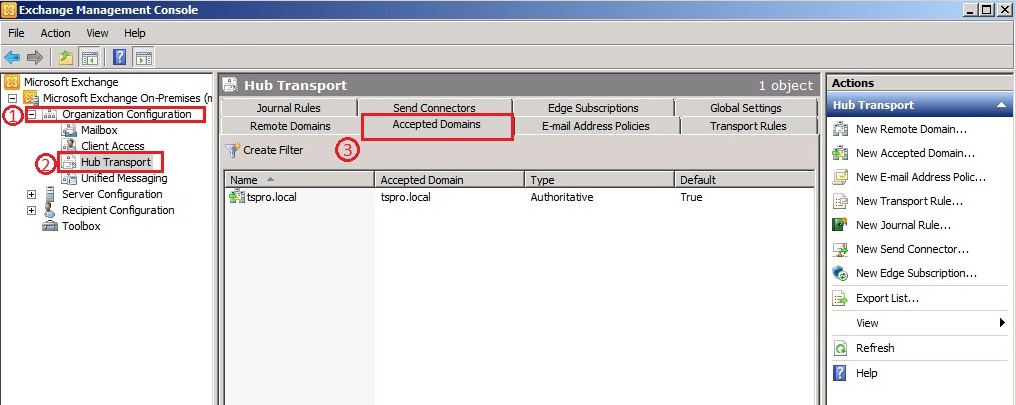
Expand the Organization Configuration node, and then click Hub Transport. In the results pane, click the Accepted Domains tab. In the action pane, click New Accepted Domain, or right-click and select the New Accepted Domain from the Accepted Domains tab. Then the New Accepted Domain wizard appears.

Image_1

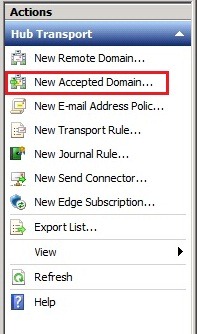
In the action pane, click New Accepted Domain, or right-click and select the New Accepted Domain from the Accepted Domains tab. Then the New Accepted Domain wizard appears.

Image_1.2

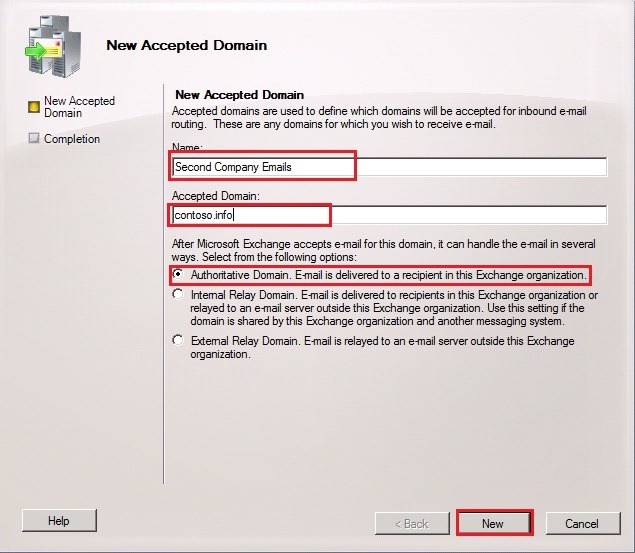
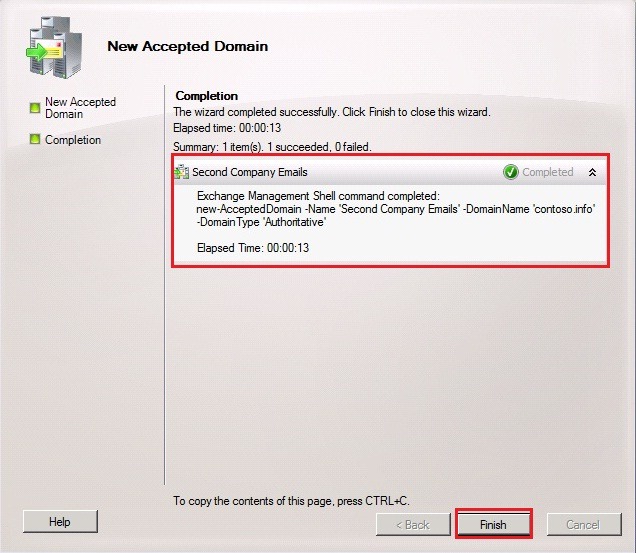
On the New Accepted Domain page, type a name to name the accepted domain entry. In the Accepted Domain field, type the SMTP domain name. Select Authoritative Domain. E-mail is delivered to a recipient in this Exchange organization. Click New to create the Accepted Domain.

Image_2

Image_3

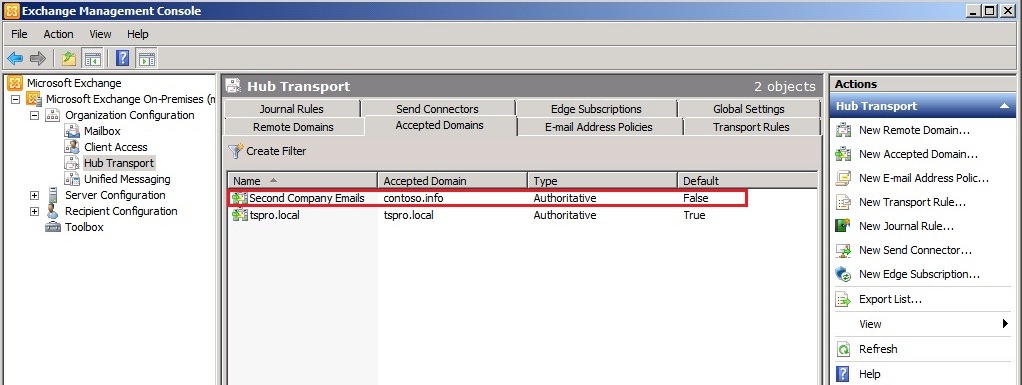
Now you can see that the Authoritative Accepted Domain contoso.info has been created and listed in the Accepted Domain tab.

Image_4

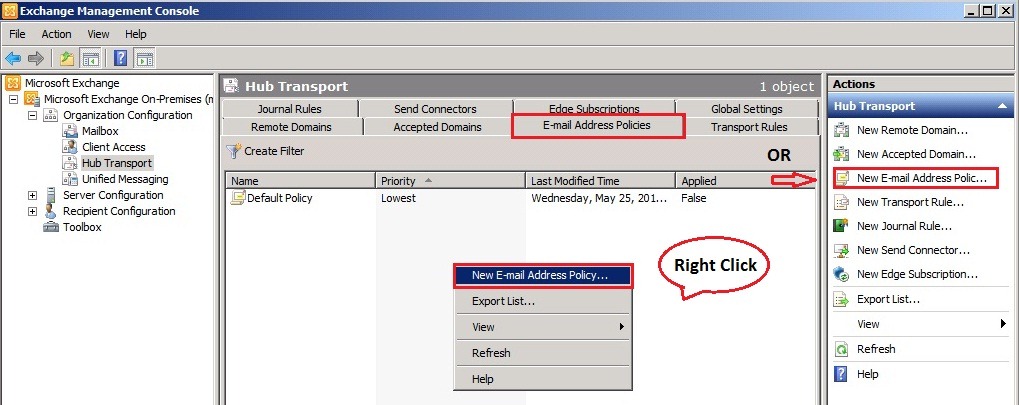
Now we need to configure the email address policy for the newly created authoritative domain. To do this either we can create new email address policy or edit the existing email address policy. I prefer to create the new email address policy. To create the new email address policy expand the Organization Configuration node, and then click Hub Transport. In the results pane, click the E-mail Address Policies tab. In the action pane, click New E-mail Address Policy or right-click and select the New E-Mail Address Policy from the E-mail Address Policies tab.

Image_5

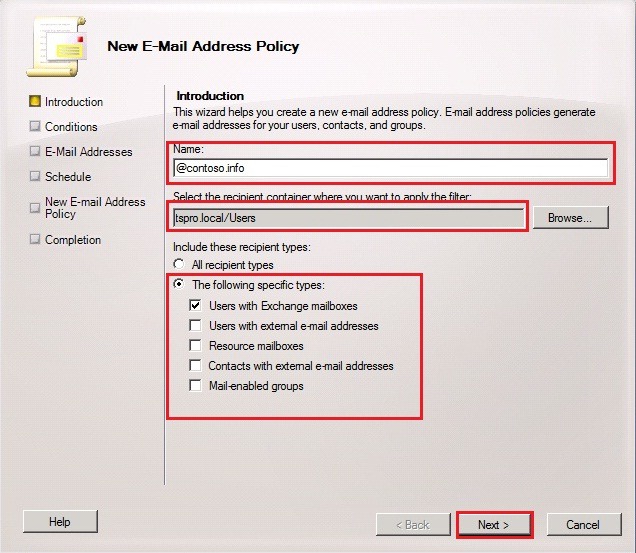
Type a name for the e-mail address policy in this example its @contoso.info. If the users that will be assigned this new e-mail address policy are all in a specific organizational unit (OU), click Browse to restrict this e-mail address policy to that specific OU. Select an option under Include these recipient types to figure which recipient types this e-mail address policy will be applied, in this example I choose Users with Exchange Mailbox, you can select this option as per your exchange environment. Click Next.

Image_6

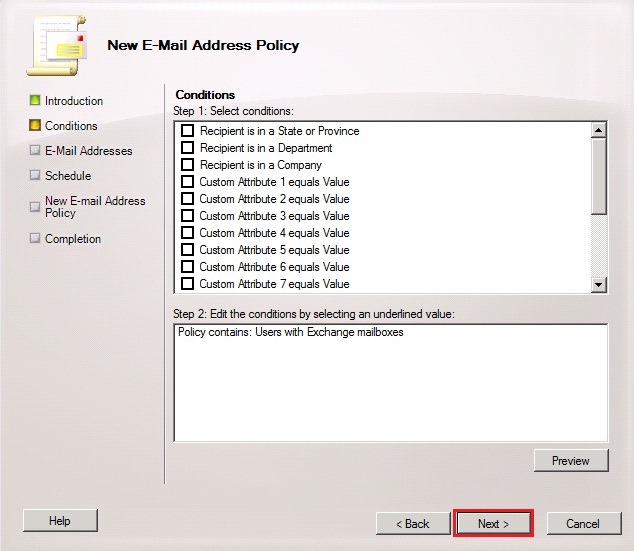
If you want to specify any condition for this policy specify the same. In this example I prefer not to specify any condition. Click Next to continue.

Image_7

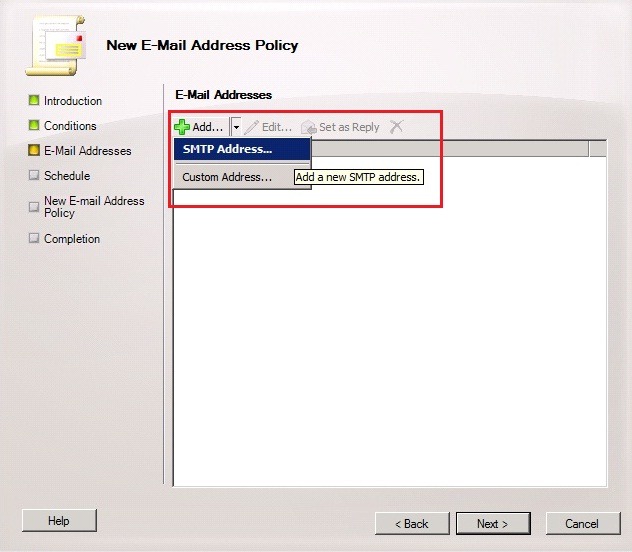
On the E-mail Addresses page, click Add to specify the domain for the E-mail Address and the E-mail address local part.

Image_8

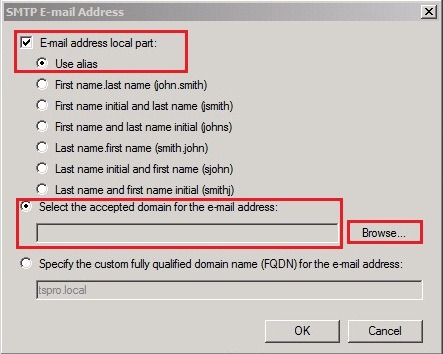
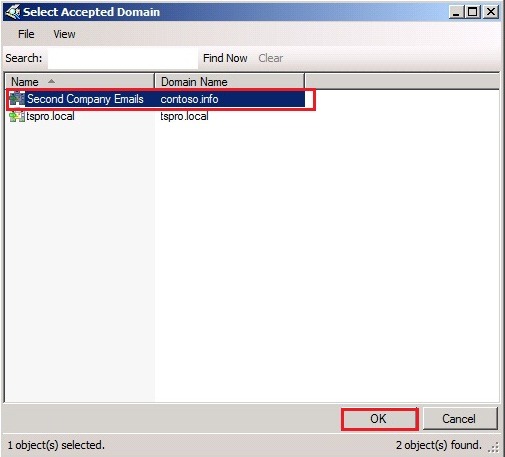
In the SMTP E-mail Address dialog box, select the option under E-mail address local part that determines how the recipient’s e-mail address alias will be generated. Click the Select the accepted domain for the e-mail address option, and then click Browse. In the Select Accepted Domain dialog box, select an accepted domain, in this example its contoso.info and then click OK. Click OK again to close the SMTP E-mail Address dialog box.

Image_9.1

Image_9

Click Next to continue.

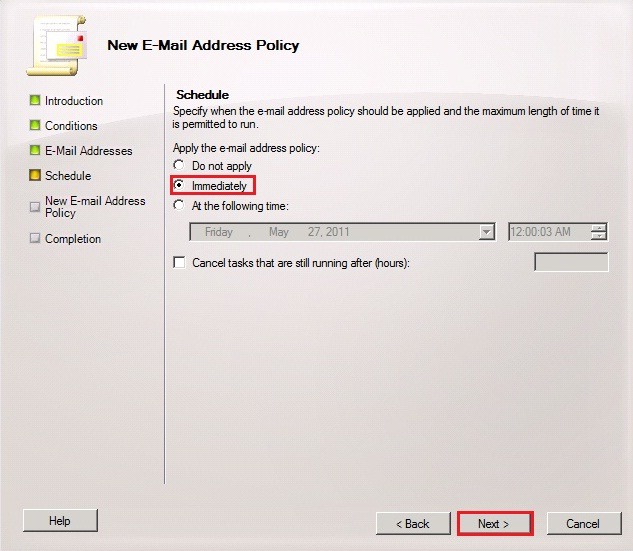
In the Schedule page, select an option to specify when the e-mail address policy will be applied and the maximum length of time that the task is permitted to run. I am choosing Immediately and click Next.

Image_11

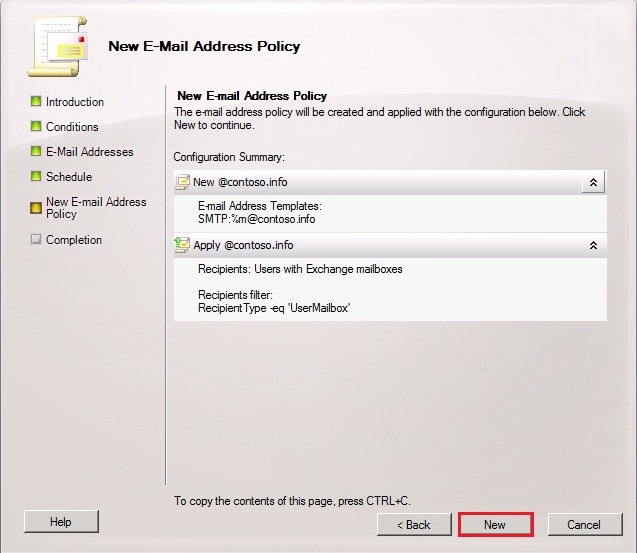
Click New to create the new E-Mail Address Policy

Image_12

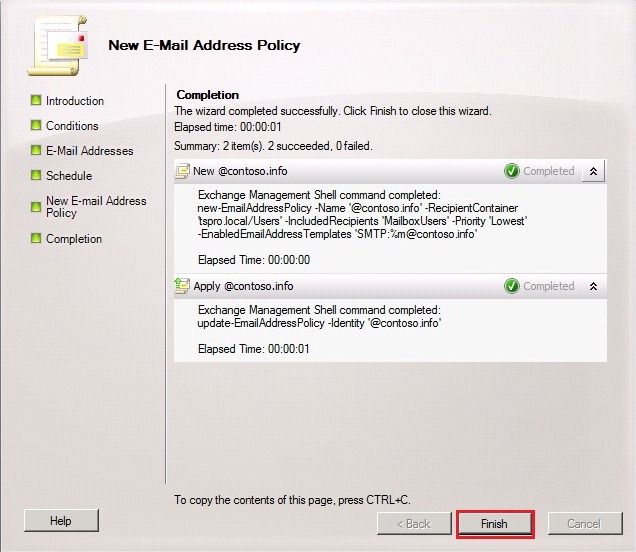
The New E-Mail Address Policy task has been completed successfully. Click Finish to exit the wizard.

Image_13

In this screenshot you can see the new email address policy has been applied.

Image_14

Useful Links

· Configure Exchange 2010 to Accept E-Mail for More Than One Authoritative Domain

· Managing E-Mail Address Policies

· Edit an E-Mail Address Policy

· Understanding E-Mail Address Policies