Exchange Server and Update Rollups Builds Numbers


image
Exchange Server

Product name

Build number

Date

Microsoft Exchange Server 2003

6.5.6944

6/30/2003

Microsoft Exchange Server 2003 SP1

6.5.7226

5/25/2004

Microsoft Exchange Server 2003 SP2

6.5.7638

10/19/2005

Microsoft Exchange Server 2007

8.0.685.24

12/9/2006

Microsoft Exchange Server 2007

8.0.685.25

12/9/2006

Microsoft Exchange Server 2007 SP1

8.1.240.6

11/29/2007

Microsoft Exchange Server 2007 SP2

8.2.176.2

8/24/2009

Microsoft Exchange Server 2007 SP3

8.3.083.6

6/20/2010

Microsoft Exchange Server 2010

14.0.639.21

11/9/2009

Microsoft Exchange Server 2010 SP1

14.1.218.15

8/24/2010


Exchange Server 2007 Service Pack 1

Product name

Build number

Date

KB

Microsoft Exchange Server Exchange 2007 SP1

8.1.240.6

11/29/2007


Update Rollup 1 for Exchange Server 2007 Service Pack 1

8.1.263.1

2/28/2008

KB945684

Update Rollup 2 for Exchange Server 2007 Service Pack 1

8.1.278.2

5/8/2008

KB948016

Update Rollup 3 for Exchange Server 2007 Service Pack 1

8.1.291.2

7/8/2008

KB949870

Update Rollup 4 for Exchange Server 2007 Service Pack 1

8.1.311.3

10/7/2008

KB952580

Update Rollup 5 for Exchange Server 2007 Service Pack 1

8.1.336.1

11/20/2008

KB953467

Update Rollup 6 for Exchange Server 2007 Service Pack 1

8.1.340.1

2/10/2009

KB959241

Update Rollup 7 for Exchange Server 2007 Service Pack 1

8.1.359.2

3/18/2009

KB960384

Update Rollup 8 for Exchange Server 2007 Service Pack 1

8.1.375.2

5/19/2009

KB968012

Update Rollup 9 for Exchange Server 2007 Service Pack 1

8.1.393.1

7/17/2009

KB970162

Update Rollup 10 for Exchange Server 2007 Service Pack 1

8.1.436.0

4/9/2010

KB981407


Exchange Server 2007 Service Pack 2

Product name

Build number

Date

KB

Microsoft Exchange Server 2007 SP2

8.2.176.2

8/24/2009


Update Rollup 1 for Exchange Server 2007 Service Pack 2

8.2.217.3

11/19/2009

KB971534

Update Rollup 2 for Exchange Server 2007 Service Pack 2

8.2.234.1

1/22/2010

KB972076

Update Rollup 3 for Exchange Server 2007 Service Pack 2

8.2.247.2

3/17/2010

KB979784

Update Rollup 4 for Exchange Server 2007 Service Pack 2

8.2.254.0

4/9/2010

KB981383

Update Rollup 5 for Exchange Server 2007 Service Pack 2

8.2.305.3

12/7/2010

KB2407132


Exchange Server 2007 Service Pack 3

Product name

Build number

Date

KB

Microsoft Exchange Server 2007 SP3

8.3.083.6

6/20/2010


Update Rollup 1 for Exchange Server 2007 Service Pack 3

8.3.106.2

9/9/2010

KB2279665

Update Rollup 2 for Exchange Server 2007 Service Pack 3

8.3.137.3

12/10/2010

KB2407025

Update Rollup 3 for Exchange Server 2007 Service Pack 3

8.3.159.0

03/2/2011

KB2492691

Update Rollup 3-v2 for Exchange Server 2007 Service Pack 3

8.3.159.2

3/30/2011

KB2530488

Update Rollup 4 for Exchange Server 2007 Service Pack 3

8.3.192.1

7/7/2011

KB2509911


Exchange Server 2010

Product name

Build number

Date

KB

Microsoft Exchange Server 2010 RTM

14.0.639.21

11/9/2009


Update Rollup 1 for Exchange Server 2010

14.0.682.1

12/9/2009

KB976573

Update Rollup 2 for Exchange Server 2010

14.0.689.0

3/4/2010

KB979611

Update Rollup 3 for Exchange Server 2010

14.0.694.0

4/9/2010

KB981401

Update Rollup 4 for Exchange Server 2010

14.0.702.1

6/17/2010

KB982639

Update Rollup 5 for Exchange Server 2010

14.0.726.0

12/13/2010

KB2407113


Exchange Server 2010 Service Pack 1

Product name

Build number

Date

KB

Microsoft Exchange Server 2010 SP1

14.1.218.15

8/24/2010


Update Rollup 1 for Exchange Server 2010 SP1

14.1.255.2

10/4/2010

KB2407028

Update Rollup 2 for Exchange Server 2010 SP1

14.1.270.1

12/9/2010

KB2425179


Update Rollup 3 for Exchange Server 2010 SP1

14.1.289.3

3/7/2011

KB2492690

Update Rollup 3-v3 for Exchange Server 2010 SP1

14.1.289.7

4/1/2011

KB2529939

Update Rollup 4 for Exchange Server 2010 SP1

14.1.323.1

6/22/2011

KB2579150

Test Office 365 Single Sign-On Using Microsoft Remote Connectivity Analyzer


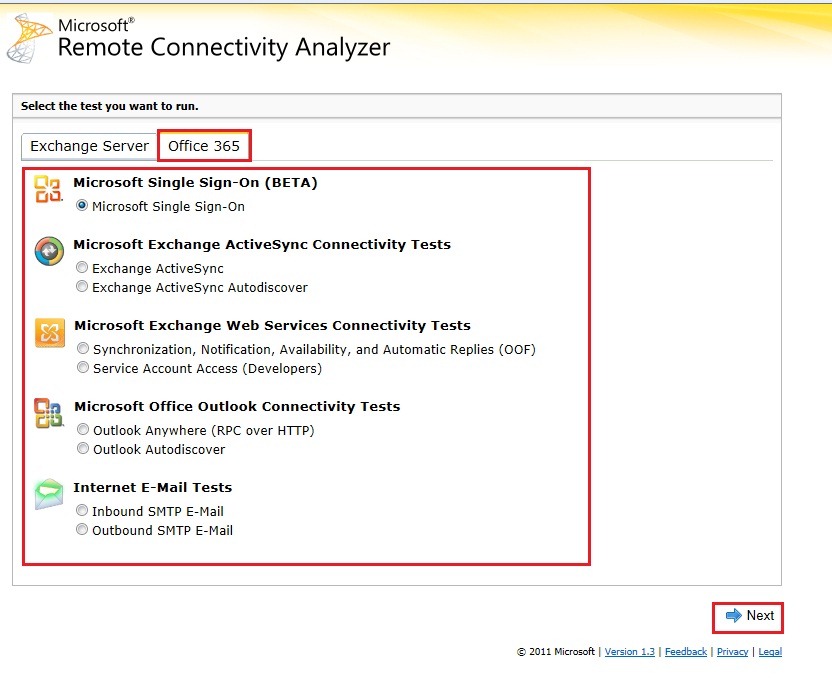
We are excited to announce that the Remote Connectivity Analyzer tool has been updated! In addition to the standard set of connectivity tests, we’ve added an Office 365 tab and a Single Sign-On test. The new Single Sign-On test will validate users’ ability to log on to Office 365 with their on-premises credentials. It also validates some basic Active Directory Federated Services (ADFS) configurations.

Here’s an overview and video demo.

Video: RCA ADFS Intro

In addition to the new tests, you will see the same great tests that were always available.

The Remote Connectivity Analyzer is available at https://www.TestExchangeConnectivity.com/.

Tip: you can also get here by going to exrca.com. Same site… just fewer characters to type.

We’re always excited to hear from you – please send us your feedback to ExRCAFB address.

Remote Connectivity Analyzer Release Notes (Also available here)
Version 1.3 (June 2011)

Office 365_2

Known Issues
  • A couple of the tests allow you to "Ignore trusts for SSL". Checking this option only tells the tool to not fail if the certificate you are using is not in the list of Trusted Root Certificates – for example, if you were using a certificate from your own Windows CA. This option does not allow the test to be completed over a non-SSL connection. If you do not have a certificate and want to test whether Exchange ActiveSync works over port 80 – this tool cannot perform this validation. We will not be able to add this feature in the future.

    Note: Due to limitations in the RPC API, we are currently unable to ignore the trust requirement for SSL for the RPC over HTTP / Outlook Anywhere tests. We are looking into alternatives for future releases.

  • Copy to clipboard doesn’t work in Firefox by default (You have to enable it)
  • Some localized strings are in English if they were modified during this update. These strings will be localized in the future.
  • While performing tests, the stage of testing will no longer update while the test is being performed. This is a necessary change for the moment due to some underlying changes to the Remote Connectivity Analyzer code. Your full test results will be available once the test is complete.
New / Modified Features
  • Microsoft Exchange Remote Connectivity analyzer is now the Microsoft Remote Connectivity Analyzer. The future direction for this tool is to incorporate more products as we have done with Office 365. Thus dropping "Exchange" from the name made sense. There are still lots of strings where you’ll see ExRCA or Exchange; we’re cleaning these up in a future release.
  • Tabbed user-interface to support multiple products and Office 365.
  • Office 365 Single sign-on validation. This test allows you to validate identity federated scenarios with Office 365. Specifically, this new test targets the "Basic Authentication" federated scenario where a client sends credentials to Office 365 which in turn validates them against the on-premises ADFS server.
  • Fixed an issue where ExRCA wouldn’t validate certain top-level domains such as .travel and .museum.
  • Added code so if the Enter key is pressed in the wizard, the default action is "next" instead of "previous". Previously, this didn’t work for browsers other than IE.
  • Better cross-browser support, fully supporting IE8-IE9 standards mode as well as other major browsers.

Source: MSExchange Team

IMPORTANT MSEXCHANGE TEAM Announcement : Exchange 2010 SP1 RU4 Removed from Download Center


We have discovered an issue impacting some customers who have installed Exchange 2010 SP1 RU4 into their Exchange environment and as a result have removed SP1 RU4 from Download Center and recommend customers do not proceed with any planned deployments of SP1 RU4.

A small number of customers have reported when the Outlook client is used to move or copy a folder that subfolders and content for the moved folder are deleted. After investigation we have determined that the folder and item contents do not appear in the destination folder as expected but may be recovered from the Recoverable Items folder (what was previously known as Dumpster in older versions of Exchange) from the original folder. This behavior occurs due to a customer requested change in SP1 RU4 which allowed deleted Public Folders to be recovered. Outlook and Exchange are not correctly processing the folder move and copy operations causing the folder contents to appear to be deleted. OWA and Exchange Web Services clients are not affected by this change and process the folder move or copy actions correctly.

We will be providing an updated Exchange fix which prevents the apparent content loss in SP1 RU5, which is scheduled for release in August. In addition, we are also working with the Outlook development team to examine their code for proper behavior and identify if a fix is necessary from the client. If you have already deployed SP1 RU4, we recommend obtaining an Interim Update that resolves this issue.

If you are a customer seeing this issue or would like to receive the Interim Update, please contact Microsoft Customer Support.

We are commencing an internal review of our processes to determine how we can best prevent issues such as this one arising in future.

Once again, on behalf of the Exchange Product Group, I want to thank you for the patience you continue to show us while we work through these issues. We deeply regret the impact that this issue has had on you, our customers, and as always, we continue to identify ways to better serve your needs through our regular servicing releases.

Source: MSEXCHANGE TEAM

Exchange Server 2010 on SBS 2011 prompt for activation!


sbs2011Πρόσφατα, αντιμετώπισα ένα θέμα το οποίο ήταν κατά κάποιο τρόπο θα το έλεγα «κουφό». Μετά από καθαρή εγκατάσταση SBS 2011, ενώ όλα πήγαν καλά με την εγκατάσταση και ενεργοποιούμε τον SBS 2011 όλα κανονικά χωρίς κανένα απολύτως θέμα, πάμε λοιπόν να ανοίξουμε την Κονσόλα διαχείρισης του Exchange 2010 SP1. Άμεσα, εμφανίστηκε το παράθυρο το οποίο μας έλεγε ότι ο Exchange server θέλει ενεργοποίηση «activation».

Exchange-2010-Unlicensed-Server-Alert
Το παρόν πρόβλημα είχε εμφανιστή και στον SBS 2008 το έχω αναφέρει εδώ.
Η αιτία του παραπάνω προβλήματος εμφανίζετε σε 2 περιπτώσεις:

  • Μετά από repair των Exchange server roles.
  • Μετά από αποτυχημένη εγκατάσταση του SBS Setup 2011.

Το παρόν θέμα επιλύετε με το ακόλουθο Hotfix KB 2527626 οποίο είναι διαθέσιμο και επιλύει το παρόν πρόβλημα KB 2527626.

Released: Update Rollup 4 for Exchange Server 2007 SP3


Earlier today the Exchange CXP team released Update Rollup 4 for Exchange Server 2007 SP3 to the Download Center.

This update contains a number of customer-reported and internally found issues since the release of RU3. For a list of changes included in this rollup, see KBA 2509911 Description of Update Rollup 4 for Exchange Server 2007 Service Pack 3. We’d like to specifically call out the following fixes which are included in this release:

  • 2531208 You cannot synchronize a folder hierarchy by using Outlook for Mac 2011 in an Exchange Server 2007 SP3 environment
  • 2528437 EWS applications cannot connect to Exchange Server 2007 servers after you make changes on accepted domains
  • 2521063 You are incorrectly displayed as a meeting organizer after you synchronize the meeting by using your mobile device in an Exchange Server 2007 environment

Update Rollup 5 for Exchange Server 2007 Service Pack 3 is currently scheduled to release in August 2011.

Source: MSExchange Team

PST Capture Tool, Coming Soon!!!


untitled


As more and more of you evaluate and deploy the email archiving, retention and discovery capabilities of Exchange Server 2010 and Exchange Online, we understand that Personal Folders (.pst files) remain a challenge for you. You have told us that having the ability to search your network to discover and then import .pst files across your environment is critical, and that you need an admin-driven and straightforward tool for doing these things.

We’re excited to announce that later this year we’ll be adding a new tool to our already rich portfolio of planning and deployment tools. This new tool, PST Capture, will be downloadable and free, and will enable you to discover .pst files on your network and then import them into both Exchange Online (in Office 365) and Exchange Server 2010 on-premises. PST Capture will be available later this year. It doesn’t replace the New-MailboxImportRequest cmdlet that exists already for importing known .pst files into Exchange Server, but instead works in parallel to enable you to embark on a systematic search and destroy mission to rid yourself of the dreaded .pst scourge <*pirate growl*>.

We’ll make more details available as we approach the release of the tool, but given the high demand for this capability, we wanted to let you know that we are working on this for you.

Source: Exchange Team