Exchange 2010 SP1: What’s new with the Exchange Best Practices Analyzer?


Wondering what’s new in Exchange Best Practices Analyzer for Exchange 2010 Service Pack 1 (ExBPA E14SP1)? Curious about how updates to the tool are being handled in Exchange 2010? Here’s the answer to some of your questions:

How do I get ExBPA E14SP1?

Since Exchange Server 2007, the Best Practices Analyzer (along with other useful Exchange troubleshooting tools) has been part of the product and installed during Exchange setup. You can find ExBPA and the tools in the Tools node of the EMC. The previous version of ExBPA (v2.8) will not download updates for Exchange 2007 or Exchange 2010; instead, you must run the version of the tool in the EMC.

Does the ExBPA E14SP1 Support Exchange 2007?

The Exchange 2010 RTM version of ExBPA does not support scanning Exchange 2007 servers. We heard your requests for Exchange 2007 support and we have responded. To support coexistence (and for ease-of-use), ExBPA E14SP1 will now scan older Exchange versions. Be aware, though, that error and warning rules for Exchange Server 2003 are in extended support and will not be updated unless the change meets the requirements for extended support. You can find more about the extended support phase in Microsoft Support Lifecycle.

What’s new in ExBPA E14SP1?

In this latest release, the BPA team, Customer Support Services and others worked together to identify and create new health checks. Changes include additional health checks for database availability groups, poison mailboxes and mixed environment support. Some other changes include:

  • Extended coverage in the “Permissions Check” scan Permissions inheritance checks have been extended and moved. They are now a part of the Permission Check scan rather than the Health Check. Tests now also include validating Role Based Access Control (RBAC) permissions. These tests include ensuring all users are able to access the Exchange Control Panel (ECP), that all out of the box RBAC Roles and Role Groups are properly configured, and that there is at least one administrative account present within the Exchange Organization.

  • Readiness checks have moved Readiness checks have been removed from ExBPA E14SP1 and incorporated into the new Exchange Pre-Deployment Analyzer (ExPDA). You can use ExPDA to perform an overall topology readiness scan of your environment. To start planning your upgrade, we recommend you begin with the Exchange Deployment Assistant.
What’s new in our release process?

With Exchange 2007 and 2010, ExBPA has moved to a release process that is in sync with the product release cycle. Updates to ExBPA are now part of Exchange product update rollups and service packs. The easiest way to get the updates is to install the update rollup on the workstation where you are running ExBPA (assuming you are at that service pack level). The ability to update only the configuration XML files during startup of the tool will still be offered, but if an update to the XML file requires an update to the binaries for proper operation, the tool will direct the user to apply the corresponding update rollup which includes both the XML and the binaries. You can expect ExBPA E14SP1 updates with Exchange 2010 SP1, as well as subsequent Service Pack and Update Rollup releases.

Where can I submit feedback?

We love to hear from you! Please send comments, questions, complaints and suggestions via the tool’s submit feedback option (click on the “Send feedback and suggestions about this tool to Microsoft” link on the bottom of the left panel.) I read each and every piece of feedback that you send.

Regards
Catastrophic Failure “JV”

Exchange 2007 SP3 and OWA S/MIME Version Mismatch


In the recently released Exchange 2007 Service Pack 3, there’s a version mismatch between the Outlook Web Access (OWA) S/MIME Control, an Active X control used to provide S/MIME support in OWA. After you install SP3, users who have the control installed will get prompted to install the latest version of the control.

The way this works – the code compares the “Version” property of the client S/MIME control (MIMECTL.DLL) on the user’s computer with the ProductVersion property of the MSI file (OWASMIME.MSI) on the Client Access Server.

During the released SP3 build, the version of the MSI file was incremented to 8.3.83.2. However, due to an error, the DLL file in the MSI retained its old version number (8.3.83.0). As a result, when Outlook Web Access users using Internet Explorer use S/MIME functionality, they get the same prompt to upgrade the S/MIME control even after they’ve upgraded.

Here are two ways to resolve this issue.

  1. If you have the Orca.exe utility, you can change the version number of the MicrosoftExchange ServerClientAccessOwasmimeowasmime.msi file from 8.3.83.2 to 8.3.83.0.
  2. Download and run the PatchMSIProductVersion.vbs script which changes the version number. Note, the download is named PatchMSIProductVersion.vbs_txt. Remove the _txt from the file extension before running it.

After you use either of the above methods, restart IIS. (Use the IISReset command.)

We apologize for any inconvenience this may have caused users.

NOTE: If your users don’t use the S/MIME control, no action is required. Some discussions in community forums include another possible workaround which suppresses the upgrade prompt by using the ForceSMIMEClientUpgrade registry key (see How to Manage S/MIME for Outlook Web Access in Exchange 2007 docs for details). Although this may work under the situation, we do not recommend using this method for this version mismatch issue on an ongoing basis.

Kind regards,

Catastrophic Failure “JV” Nerd smile

Source:
This post was taken from :MSExchange Team

Publishing Exchange Server 2010 with Forefront Unified Access Gateway 2010 and Forefront Threat Management Gateway 2010


By allowing remote access to Microsoft Exchange to users who are based outside the safety of the corporate network, an organization enables its employees to take full advantage of the technology their company provides. Remote access lets employees use many devices to communicate with their peers and customers from any place and at any time.

Allowing access to corporate resources from any location, perhaps using devices that are not controlled by the organization, presents additional risk to the security of the data and services being accessed. Therefore it’s critical to take measures to ensure that the data is being accessed securely, which means implementing technologies such as certificates, firewalls, enforcing pre-authentication, and device or endpoint validation. The key concept to understand is that applying security to any solution is a multi-layered task that includes identifying the threats, reducing the attack surface area, removing unnecessary access points, and enforcing authentication. The casual attacker will usually give up after a few failed attempts to access a resource.

When you publish Exchange, Microsoft offers two software-based options: Microsoft Forefront Threat Management Gateway 2010 (Forefront TMG) and Microsoft Forefront Unified Access Gateway 2010 (Forefront UAG). Both options offer publishing wizards and security features to provide secure access to Exchange when it’s accessed from outside the safety of the corporate network.

There are other ways to publish Exchange besides using Forefront TMG or Forefront UAG. This technical guide isn’t intended to provide the only information you use for a complex organization or one with special security constraints. Instead, it’s intended only as a walkthrough to help you publish Exchange on both these platforms, using basic configuration options. If you have a large organization, it’s likely that you’ll need additional applications or have to factor in additional security considerations. Such applications and security considerations are beyond the scope of this document.

This white paper provides detailed information about publishing Microsoft Exchange Server 2010 using Forefront TMG or Forefront UAG, including how to choose between them for different scenarios, and provides specific steps you can take to configure Forefront TMG and Forefront UAG to publish Exchange 2010.

The link to download the whitepaper is :

Download details: Publishing Exchange with Forefront
http://www.microsoft.com/downloads/details.aspx?FamilyID=894bab3e-c910-4c97-ab22-59e91421e022&displaylang=en

Kind regards,

Catastrophic Failure “JV” Nerd smile

Windows Phone 7 Enterprise features overview


windows-phone-7-series[5]


Bearing in mind the release of the upcoming  Series, I would like to introduce you the high level overview of the features for the Enterprise version.

So being, TechRepublic posted a good overview that can be found in the link below :

Windows Phone 7 enterprise features overview
http://blogs.techrepublic.com.com/smartphones/?p=1111

Kind regards,
Catastrophic Failure “JV” Nerd smile

BlackBerry Enterprise Server (BES) and Microsoft Exchange Server 2010


blackberry-enterprise-server-expressMicrosoft recognized that many customers rely on BlackBerry Servers.

This is why they collaborated already closely with RIM to add BlackBerry Support to Exchange Server 2010.

BlackBerry Enterprise Server (BES) is now fully supported on Microsoft Exchange Server 2010 and BlackBerry Technical Support Services are readily available.

In order to enable full support, this updates are required:

All three of these updates are available to customers of Exchange Server 2010 and BlackBerry Enterprise Server v.5.0 with Service Pack 1 at no cost. BlackBerry Enterprise Server v5.0 Service Pack 1 and Maintenance Release 1 can be found here: http://www.blackberry.com/support/downloads

Additional information on the solution requirements, preparing the BlackBerry environment for Microsoft Exchange Server 2010, can be found on the BlackBerry site here.

Taken from :BlackBerry Enterprise Server (BES) and Microsoft Exchange Server 2010 – WSSRA
http://msmvps.com/blogs/wssra/archive/2009/12/10/blackberry-enterprise-server-bes-and-microsoft-exchange-server-2010.aspx

Regards
Catastrophic Failure “JV”
Nerd smile

Install Exchange 2007 SP3 to Windows Srv. 2008 R2


In this Post, will see the installation of Exchange 2007 SP3 on Windows Server 2008 R2. A few months ago, installing the Exchange 2007 on Windows Server 2008 R2 was not supportable.  This third service pack for Exchange 2007, enables Exchange 2007 to be installed on the Windows Server 2008 R2 version.  Let’s go to see the installation process.

Before you begin the installation process for Exchange 2007 SP3 on Windows Server 2008 R2, you must install the Hotfix KB 982720 (CDOEX on Windows Server 2008 R2 requires a registry key permission change when you install Exchange Server 2007 SP3), This enables the administrator to change the value of the registry key during the Exchange Server 2007 SP3 installation process. Otherwise (if the Hotfix is not installed) and proceed with Exchange 2007 SP3 installation, you will receive a Warning message.

Image_2

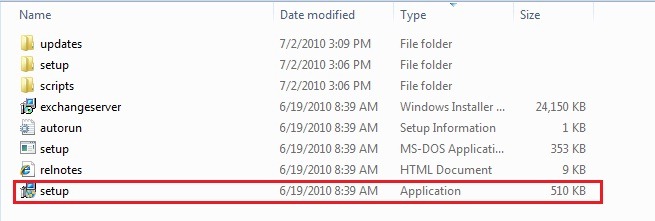
1. Go to the folder which you have download from Microsoft site the Exchange 2007 SP3, unzip the Exchange 2007 SP3 package first, then launch setup program.

Image_3

2. Follow the wizard, start to install SP3, you can see the following screenshot.

Image_4

3. Read through the introduction and click Next button.

Image_5

4. Read through the license agreement, accept it and click Next button.

Image_6 

5. Next step Readiness Checks, Setup wizard finished successfully click Install.

Image_10

9. Completion and final step is completed successfully, choose Finish.

Image_11

After the installation is complete, we’ll see the following message, which informs us that we need to reboot the system for changes to take affect.

Image_12 

After reboot we can see that our Exchange Server was installed successfully SP3, Build number 8.3.083.6.

Image_13


Additional information you can find bellow:

Enjoy….Smile

Catastrophic Failure “JV”

Exchange Server and Update Rollups Builds Numbers


exchange2010logo7333411_5DDF14B0This Wiki page lists the Exchange Server versions and Update Rollups with release dates and KB respectively.

Exchange Server

Product name

Build number

Date

Microsoft Exchange Server 2003

6.5.6944

6/30/2003

Microsoft Exchange Server 2003 SP1

6.5.7226

5/25/2004

Microsoft Exchange Server 2003 SP2

6.5.7638

10/19/2005

Microsoft Exchange Server 2007

8.0.685.24

12/9/2006

Microsoft Exchange Server 2007

8.0.685.25

12/9/2006

Microsoft Exchange Server 2007 SP1

8.1.240.6

11/29/2007

Microsoft Exchange Server 2007 SP2

8.2.176.2

8/24/2009

Microsoft Exchange Server 2007 SP3

8.3.083.6

6/20/2010

Microsoft Exchange Server 2010

14.0.639.21

11/9/2009

Exchange Server 2007 Service Pack 1

Product name

Build number

Date

KB

Microsoft Exchange Server Exchange 2007 SP1

8.1.240.6

11/29/2007

Update Rollup 1 for Exchange Server 2007 Service Pack 1

8.1.263.1

2/28/2008

KB945684

Update Rollup 2 for Exchange Server 2007 Service Pack 1

8.1.278.2

5/8/2008

KB948016

Update Rollup 3 for Exchange Server 2007 Service Pack 1

8.1.291.2

7/8/2008

KB949870

Update Rollup 4 for Exchange Server 2007 Service Pack 1

8.1.311.3

10/7/2008

KB952580

Update Rollup 5 for Exchange Server 2007 Service Pack 1

8.1.336.1

11/20/2008

KB953467

Update Rollup 6 for Exchange Server 2007 Service Pack 1

8.1.340.1

2/10/2009

KB959241

Update Rollup 7 for Exchange Server 2007 Service Pack 1

8.1.359.2

3/18/2009

KB960384

Update Rollup 8 for Exchange Server 2007 Service Pack 1

8.1.375.2

5/19/2009

KB968012

Update Rollup 9 for Exchange Server 2007 Service Pack 1

8.1.393.1

7/17/2009

KB970162

Update Rollup 10 for Exchange Server 2007 Service Pack 1

8.1.436.0

4/9/2010

KB981407

Exchange Server 2007 Service Pack 2

Product name

Build number

Date

KB

Microsoft Exchange Server 2007 SP2

8.2.176.2

8/24/2009

Update Rollup 1 for Exchange Server 2007 Service Pack 2

8.2.217.3

11/19/2009

KB971534

Update Rollup 2 for Exchange Server 2007 Service Pack 2

8.2.234.1

1/22/2010

KB972076

Update Rollup 3 for Exchange Server 2007 Service Pack 2

8.2.247.2

3/17/2010

KB979784

Update Rollup 4 for Exchange Server 2007 Service Pack 2

8.2.254.0

4/9/2010

KB981383

Exchange Server 2007 Service Pack 3

Product name

Build number

Date

Microsoft Exchange Server 2007 SP3

8.3.083.6

6/20/2010

Exchange Server 2010

Product name

Build number

Date

KB

Microsoft Exchange Server 2010 RTM

14.0.639.21

11/9/2009

Update Rollup 1 for Exchange Server 2010

14.0.682.1

12/9/2009

KB976573

Update Rollup 2 for Exchange Server 2010

14.0.689.0

3/4/2010

KB979611

Update Rollup 3 for Exchange Server 2010

14.0.694.0

4/9/2010

KB981401

Update Rollup 4 for Exchange Server 2010

14.0.702.1

6/17/2010

KB982639

Exchange Server 2010 Service Pack 1 Beta

Product name

Build number

Date

Microsoft Exchange Server 2010 SP1 Beta

14.1.180.2

6/5/2010