
In this Post, will see the installation of Exchange 2007 SP3 on Windows Server 2008 R2. A few months ago, installing the Exchange 2007 on Windows Server 2008 R2 was not supportable. This third service pack for Exchange 2007, enables Exchange 2007 to be installed on the Windows Server 2008 R2 version. Let’s go to see the installation process.
Before you begin the installation process for Exchange 2007 SP3 on Windows Server 2008 R2, you must install the Hotfix KB 982720 (CDOEX on Windows Server 2008 R2 requires a registry key permission change when you install Exchange Server 2007 SP3), This enables the administrator to change the value of the registry key during the Exchange Server 2007 SP3 installation process. Otherwise (if the Hotfix is not installed) and proceed with Exchange 2007 SP3 installation, you will receive a Warning message.

1. Go to the folder which you have download from Microsoft site the Exchange 2007 SP3, unzip the Exchange 2007 SP3 package first, then launch setup program.
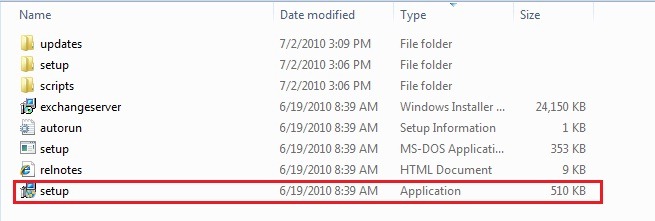
2. Follow the wizard, start to install SP3, you can see the following screenshot.

3. Read through the introduction and click Next button.

4. Read through the license agreement, accept it and click Next button.

5. Next step Readiness Checks, Setup wizard finished successfully click Install.

9. Completion and final step is completed successfully, choose Finish.

After the installation is complete, we’ll see the following message, which informs us that we need to reboot the system for changes to take affect.

After reboot we can see that our Exchange Server was installed successfully SP3, Build number 8.3.083.6.

Additional information you can find bellow:
- ·What’s New in Exchange Server 2007 SP3
http://technet.microsoft.com/en-us/library/ff607226(EXCHG.80).aspx - Exchange Server 2007 Service Pack 3
http://www.microsoft.com/downloads/details.aspx?FamilyID=1687160b-634a-43cb-a65a-f355cff0afa6&displaylang=en
Enjoy….
Catastrophic Failure “JV”
 Catastrophic Failure