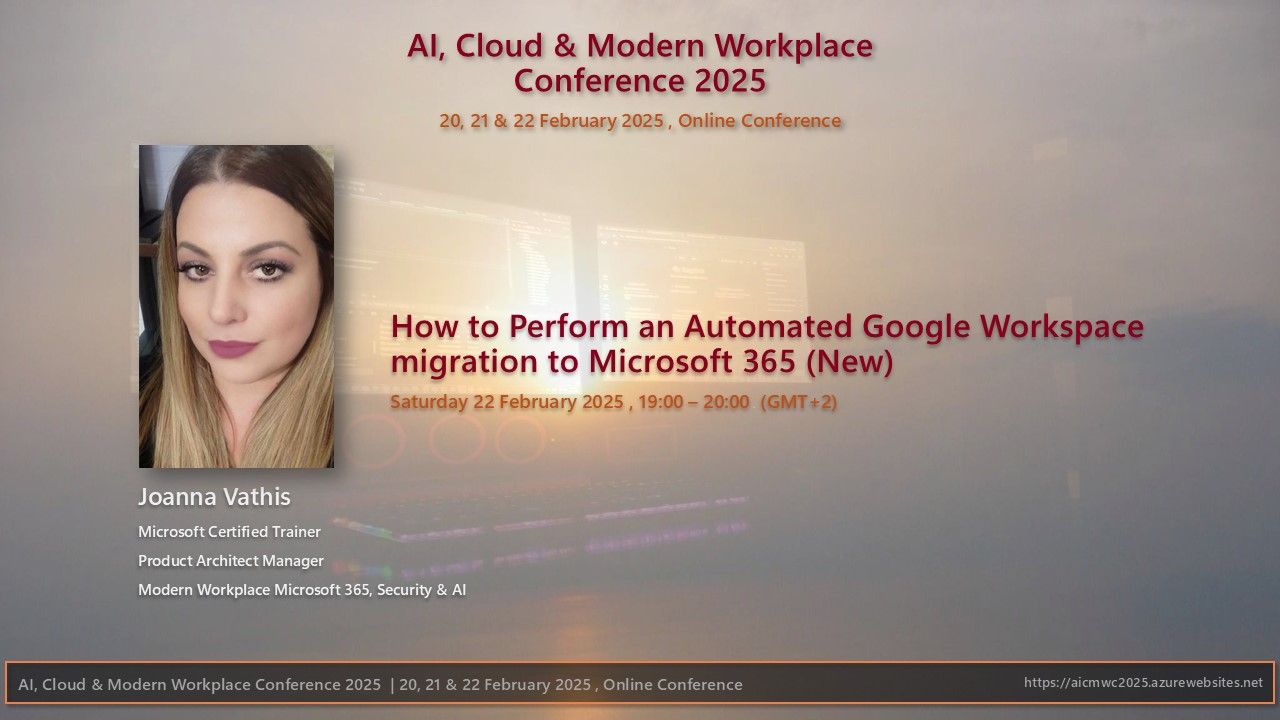
📌📖 Title of Presentation: How to Perform an Automated Google Workspace Migration to Microsoft 365 (New)
I’m excited to share some insights about the amazing features of How to Perform an Automated Google Workspace migration to Microsoft 365. Migrating from Google Workspace to Microsoft 365 can be quite a daunting task, particularly when dealing with mailboxes over 100 GB. But fear not! In our presentation, we will delve into the challenges and solutions for a successful migration, catering to both normal and large mailboxes. We will start by discussing the various challenges that come with such a migration. From there, we will move on to the importance of thorough planning to ensure a smooth transition. Next, we will introduce a new way of migrating from Google Workspace to Microsoft 365, detailing the methods to handle large mailboxes effectively. To make things even more engaging, we will have a live demo to showcase the process in action. And of course, we will wrap things up with a Q&A session to address any questions or concerns you may have.
Challenges
Planning
New way of migration from Google Workspace migration to Microsoft 365
Methods to migrate large mailboxes to Microsoft 365
Demo
Q & A
❤️ Join us on Saturday, 22 February 2025, from 19:00 to 20:00 (GMT+2) to gain invaluable insights from Joanna. We are honored to have her share her expertise at our conference! A big thank you to Joanna for her valuable help and selfless contribution to the community. We are truly grateful for her presence and look forward to learning from her expertise. Don’t miss this opportunity to learn from one of the best in the industry!
The Scareware Blocker is a New feature in Microsoft Edge designed to protect users from tech support scams, often referred to as scareware. These scams use aggressive web pages to trick users into thinking their system is infected with malware, pressuring them to call fake tech support numbers. Scareware blockers use a machine learning model to recognize the tell-tale signs of scareware scams and put users back in control of their computer.
Here’s how it works:
Machine Learning: It uses a machine learning model to detect and block scareware sites.
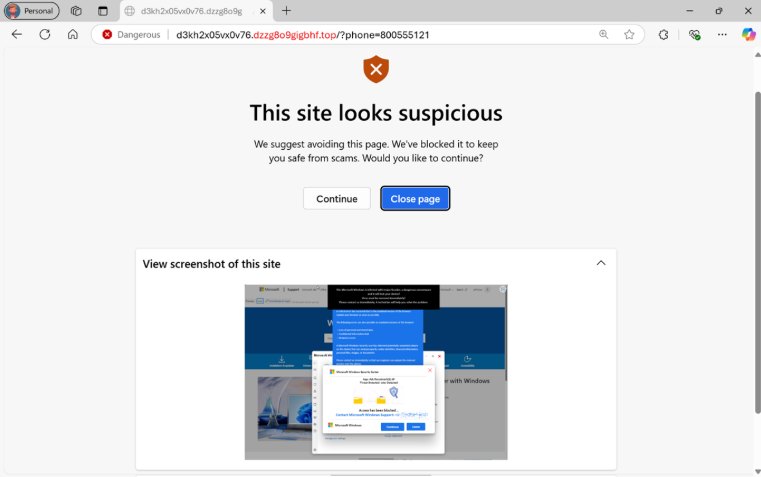
User Control: When a suspicious site is detected, Edge blocks it and shows a warning message, giving users the option to close the page or proceed if they believe it’s safe
“Scareware” scams are a particularly convincing type of tech support scam. They use aggressive web pages to convince victims into thinking their system is infected with malware, pressure them to call a fake tech support number, and try to gain access to the computer. Last year, Hollywood even made a blockbuster action movie with scareware scammers as the villains.
To enable Scareware Blocker in Microsoft Edge:
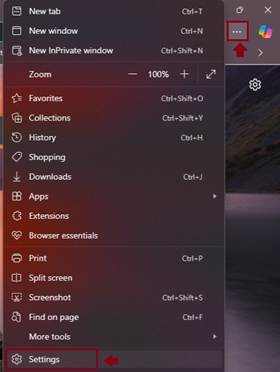
Open Edge and click on the three-dot menu in the toolbar.
Select Settings.
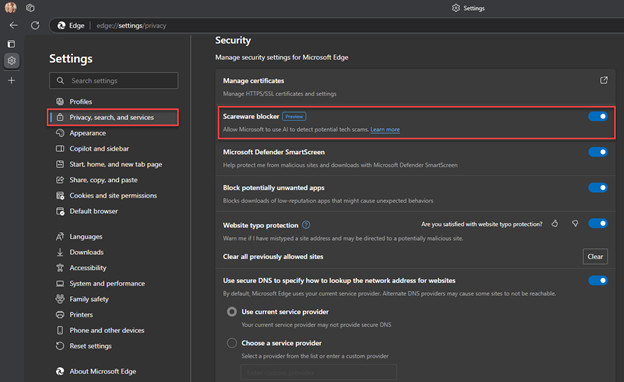
Navigate to Privacy, search, and services.
Find the Scareware Blocker option and toggle it on
When scareware blocker suspects a page is a scam, Edge will put users back in control by exiting full screen mode, stopping aggressive audio playback, warning the user, and showing a thumbnail of the page they were just viewing:
Scareware blocker fights tech scams – Video Tutorial
Microsoft 365 Copilot is a sophisticated processing and orchestration engine that provides AI-powered productivity capabilities by coordinating the following components:
Large language models (LLMs)
Content in Microsoft Graph, such as emails, chats, and documents that you have permission to access.
The Microsoft 365 productivity apps that you use every day, such as Word and PowerPoint.
How does Microsoft 365 Copilot use your proprietary organizational data?
Microsoft 365 Copilot provides value by connecting LLMs to your organizational data. Microsoft 365 Copilot accesses content and context through Microsoft Graph. It can generate responses anchored in your organizational data, such as user documents, emails, calendar, chats, meetings, and contacts. Microsoft 365 Copilot combines this content with the user’s working context, such as the meeting a user is in now, the email exchanges the user had on a topic, or the chat conversations the user had last week. Microsoft 365 Copilot uses this combination of content and context to help provide accurate, relevant, and contextual responses.
Microsoft 365 Copilot only surfaces organizational data to which individual users have at least view permissions. It’s important that you’re using the permission models available in Microsoft 365 services, such as SharePoint, to help ensure the right users or groups have the right access to the right content within your organization. This includes permissions you give to users outside your organization through inter-tenant collaboration solutions, such as shared channels in Microsoft Teams.
When you enter prompts using Microsoft 365 Copilot, the information contained within your prompts, the data they retrieve, and the generated responses remain within the Microsoft 365 service boundary, in keeping with our current privacy, security, and compliance commitments. Microsoft 365 Copilot uses Azure OpenAI services for processing, not OpenAI’s publicly available services. Azure OpenAI doesn’t cache customer content and Copilot modified prompts for Microsoft 365 Copilot.
Data stored about user interactions with Microsoft 365 Copilot
When a user interacts with Microsoft 365 Copilot (using apps such as Word, PowerPoint, Excel, OneNote, Loop, or Whiteboard), we store data about these interactions. The stored data includes the user’s prompt and Copilot’s response, including citations to any information used to ground Copilot’s response. We refer to the user’s prompt and Copilot’s response to that prompt as the “content of interactions” and the record of those interactions is the user’s Copilot activity history. For example, this stored data provides users with Copilot activity history in Microsoft 365 Copilot Chat (previously named Business Chat) and meetings in Microsoft Teams. This data is processed and stored in alignment with contractual commitments with your organization’s other content in Microsoft 365. The data is encrypted while it’s stored and isn’t used to train foundation LLMs, including those used by Microsoft 365 Copilot.
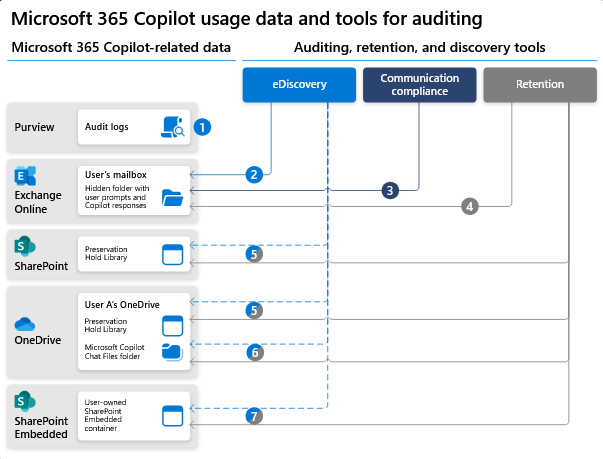
To view and manage this stored data, admins can use Content search or Microsoft Purview. Admins can also use Microsoft Purview to set retention policies for the data related to chat interactions with Copilot. For Microsoft Teams chats with Copilot, admins can also use Microsoft Teams Export APIs to view the stored data.
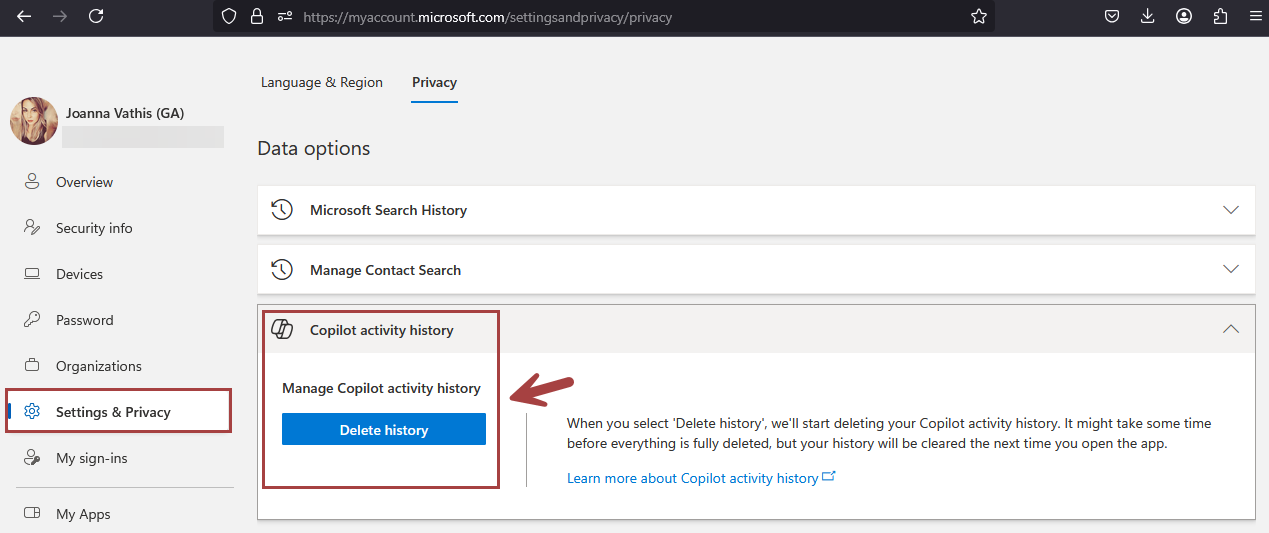
Deleting the history of user interactions with Microsoft 365 Copilot
Microsoft 365 Copilot calls to the LLM are routed to the closest data centers in the region, but also can call into other regions where capacity is available during high utilization periods.
For European Union (EU) users, we have additional safeguards to comply with the EU Data Boundary. EU traffic stays within the EU Data Boundary while worldwide traffic can be sent to the EU and other countries or regions for LLM processing. The EU Data Boundary is a geographically defined boundary within which Microsoft has committed to store and process Customer Data and personal data for our Microsoft enterprise online services, including Azure, Dynamics 365, Power Platform, and Microsoft 365, subject to limited circumstances where Customer Data and personal data will continue to be transferred outside the EU Data Boundary.
How does Microsoft 365 Copilot protect organizational data?
The permissions model within your Microsoft 365 tenant can help ensure that data won’t unintentionally leak between users, groups, and tenants. Microsoft 365 Copilot presents only data that each individual can access using the same underlying controls for data access used in other Microsoft 365 services. Semantic Index honors the user identity-based access boundary so that the grounding process only accesses content that the current user is authorized to access.
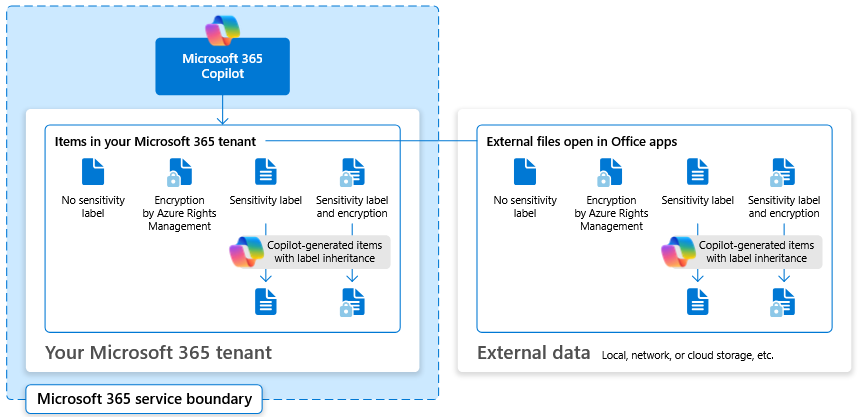
Copilot works together with your Microsoft Purviewsensitivity labels and encryption to provide an extra layer of protection. The following diagram provides a visual representation of how Copilot honors your information protection controls using sensitivity labels and encryption.
Copilot will only work with your M365 tenant data and won’t be able to access other companies’ data. Plus, your data doesn’t train the AI for other companies to leverage..
🔝I am excited to announce that I will be speaking at the “Διημερίδα Ψηφιακής Εξέλιξης in Corfu, taking place on February 7-8! @silicon_corfu
📆Title: Get started with Microsoft 365 Copilot in Excel 📝Description: I’m excited to share some insights about the amazing features of Microsoft 365 Copilot in Excel. This innovative tool is designed to help you work more efficiently with your data by providing intelligent suggestions and insights.
With Copilot in Excel, you can do much more with your data. It generates formula column suggestions, shows insights in charts and PivotTables, and highlights interesting data, making it easier for you to uncover valuable information.
In our upcoming presentation, we will explore these features in detail and see how they can enhance our productivity:
📍Formulas: Writing, explaining, and asking questions 📍More formula use cases 📍Working with text 📍Visualize: Charts and Color 📍Ask questions about Excel 📍Demo
🚀 I look forward to seeing you there! Don’t miss the opportunity to participate in this important event and enrich your knowledge of the latest Microsoft technologies. Register now for free and join us for discussions and learning!





 Catastrophic Failure