

Microsoft Defender is updating the Export-QuarantineMessage cmdlet to include a new -PasswordV2 parameter for plain text passwords, replacing the old -Password parameter. Microsoft offer the -PasswordV2 parameter as a new experience that allows admins and users to pass plain text for their passwords when exporting Quarantine items in PowerShell cmdlet. Admins and users should use the -PasswordV2 parameter, because using the previous -Password parameter may cause errors and –Password won’t be available in the longer term.
For files that were quarantined by Safe Attachments for SharePoint, OneDrive, and Microsoft Teams, the files are exported in Base64 format.
Export-QuarantineMessage cmdlet functionality before this rollout:

Export-QuarantineMessage cmdlet functionality after this rollout:
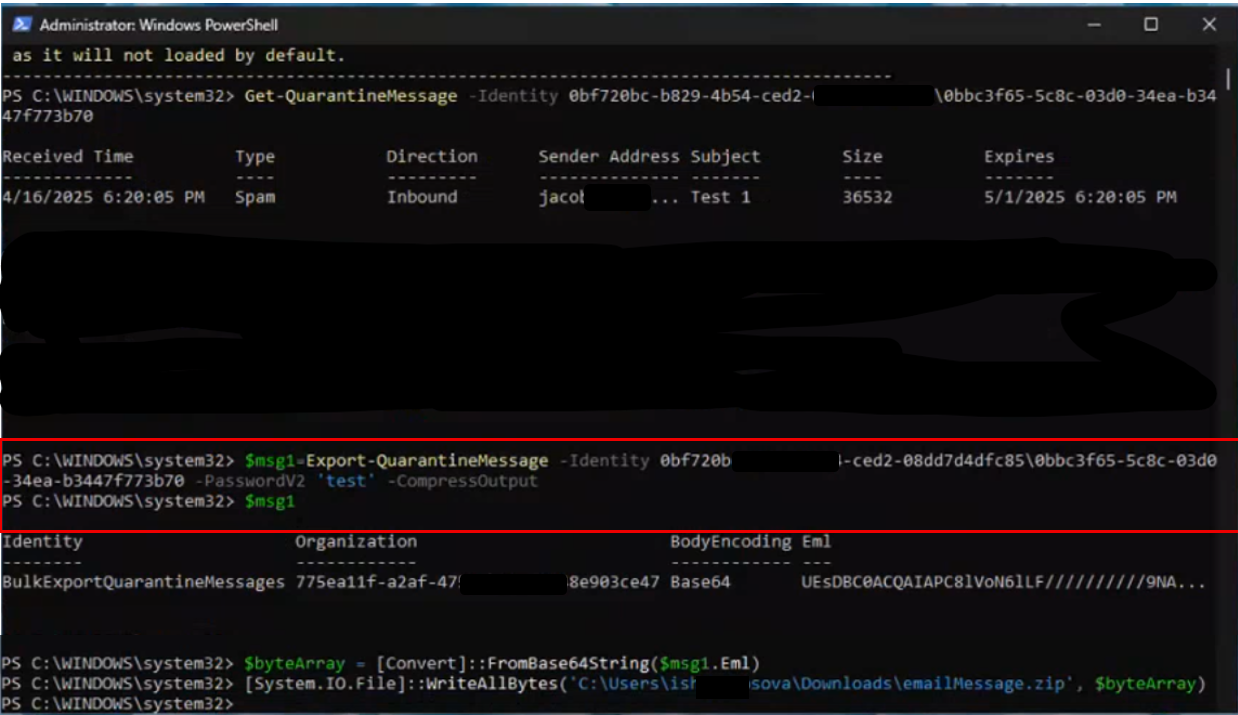
Use the Export-QuarantineMessage cmdlet to export quarantined messages and files from your cloud-based organization. Messages are exported to .eml message files so you can open them in Outlook.
PowerShell:
$f = Export-QuarantineMessage -Identity 9c6bb3e8-db9e-4823-9759-08d594179bd3\7fec89fe-41b0-ae67-4887-5bede017d111
$bytes = [Convert]::FromBase64String($f.eml)
[IO.File]::WriteAllBytes("C:\My Documents\Quarantined Message with Attachments.eml", $bytes)
This example exports the specified message with attachments that was quarantined as malware:
- The first command exports the quarantined message and attachments to the variable
$f. The message and attachments are stored in the Eml property (the$f.emlvalue) as Base64 (based on the$f.BodyEncodingvalue). - The second command converts the Eml property from Base64 to bytes and stores the result in the variable
$bytes. - The third command writes the quarantined message and attachments to the specified .eml file.
 Catastrophic Failure