
Microsoft has multi-tenant organizations, a new Entra ID solution that’s available in Preview.

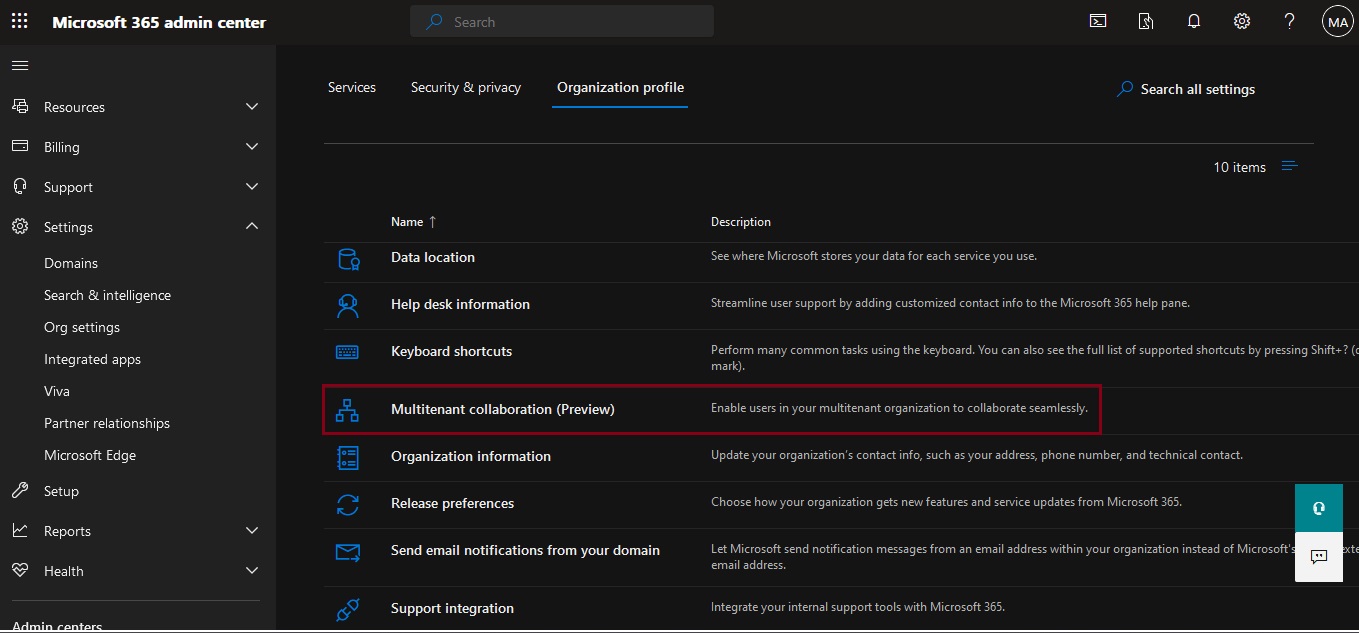
The multitenant organization capability is designed for organizations that own multiple Microsoft Entra tenants and want to streamline intra-organization cross-tenant collaboration in Microsoft 365. It’s built on the premise of reciprocal provisioning of B2B member users across multitenant organization tenants.
Collaboration in Microsoft 365 is built on the premise of reciprocal provisioning of B2B identities across multitenant organization tenants.
Members Not Guests
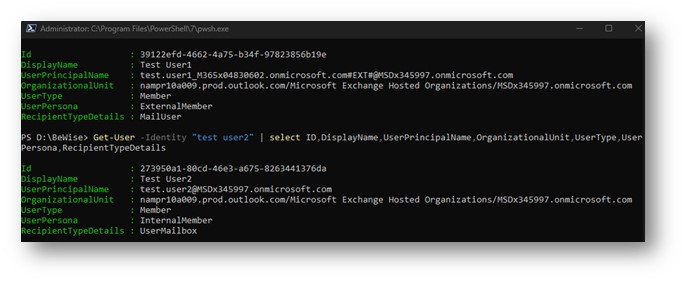
When Entra ID synchronizes accounts from a source tenant to a target tenant, it creates the entries in the target tenant as member accounts, not guest accounts. If you examine the properties of a synchronized account, you can see that the user principal name looks like a guest account but the user type is the same as a regular user account:
Side-by-side multitasking and cross-tenant notifications
With the new Teams client, users can now work across multiple tenants and accounts in side-by-side windows. They can join a meeting or collaborate in a channel hosted in another tenant, and simultaneously compose chat messages in their own tenant. Users can receive cross-tenant notifications for all accounts and tenants added to the Teams client, no matter which one is currently in focus.
Limitations for multitenant organizations in Microsoft 365 preview
The following are limitations of the multitenant organizations in Microsoft 365 preview:
- A maximum of five tenants in the multitenant organization is supported.
- A maximum of 100,000 users per tenant is supported.
- Teams on the web, Microsoft Teams Rooms (MTR), and VDI/AVD aren’t supported.
- The ability to grant or revoke permission to receive notifications from other tenants and to switch between tenants isn’t supported on mobile.
- People in your organization links may not work for users from another tenant if their account had originally been a guest and they had previously accessed SharePoint resources.
- It might take up to seven days for a user to appear in search once they’ve been synchronized. Contact Microsoft support if users aren’t searchable after seven days.
- Support for a guest UserType of member in Power BI is currently in preview. For more information, see Distribute Power BI content to external guest users with Microsoft Entra B2B.
If you want to add more than five tenants or 100,000 users per tenant, contact Microsoft support.
Cross-tenant synchronization in Microsoft Teams:
- Cross-tenant synchronization is a one-way process. This means that users from the source tenant are synchronized to the target tenant, but not the other way around.
- Synchronized users have their own account in the target tenant. This means that they have their own profile, mailbox, and Teams chat history.
- Synchronized users can access Teams in the target tenant. They can chat with other users, join teams, and participate in meetings.
- Synchronized users cannot access other Microsoft 365 services in the target tenant. This is because they are not considered to be full members of the target tenant.
The basic issue here is that the original cross-tenant synchronization mechanism wasn’t tailored to support Microsoft 365 apps. The MTO (Multi-Tenant Organization) is explicitly engineered to support Microsoft 365, so it looks (from initial tests) that the use objects synchronized to another tenant a) appear in the GAL and b) are routable because their SMTP mail address is valid.
In the next post we will go deeper on how to configure MTO step by step. Stay tune for more goodies …
 Catastrophic Failure