
On the 25th of April, Microsoft announced a robust set of multi-tenant organization (MTO) capabilities within Microsoft 365, now generally available to enhance any organization’s collaboration, communication, and administration across multiple tenants. These capabilities span Microsoft 365 People Search, Microsoft Teams, Viva Engage and Microsoft Defender XDR, which can be enabled via the Microsoft 365 admin center or Microsoft Entra admin center.
This segmentation can cause frustration when users need to communicate and collaborate across tenant boundaries, whilst IT admins need to perform the same set of administrative tasks per tenant to maintain their organization.
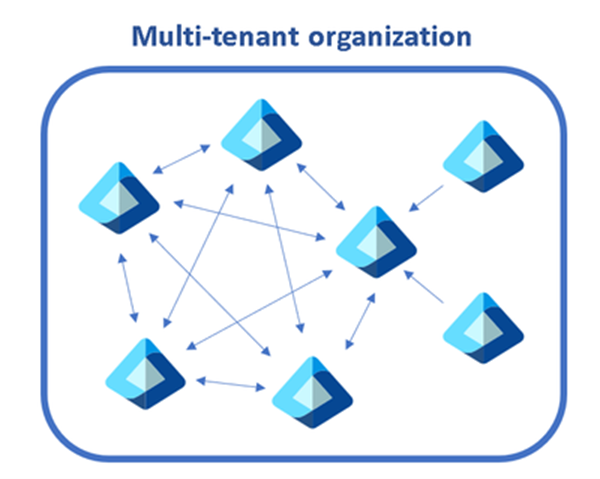
A diagram showing multiple tenants within a single organization.
The capabilities we discuss below help multi-tenant organizations address these complexities, while staying compliant and secure:
- Find people across organizations easily: Search for and communicate with colleagues in a unified manner with improved people search. Every search now returns a single, accurate result, simplifying how you connect with the right colleague.
- Streamlined workforce collaboration: Engage in calls, chats, and meetings across tenants without the barriers of meeting lobbies. Enjoy immediate access to meeting content and collaborative tools in real time.
- Unlock new ways for employees and leaders to connect: We’ve broadened the capabilities in Viva Engage, facilitating cross-tenant announcements and enabling community interaction and campaign participation that extend beyond tenant boundaries.
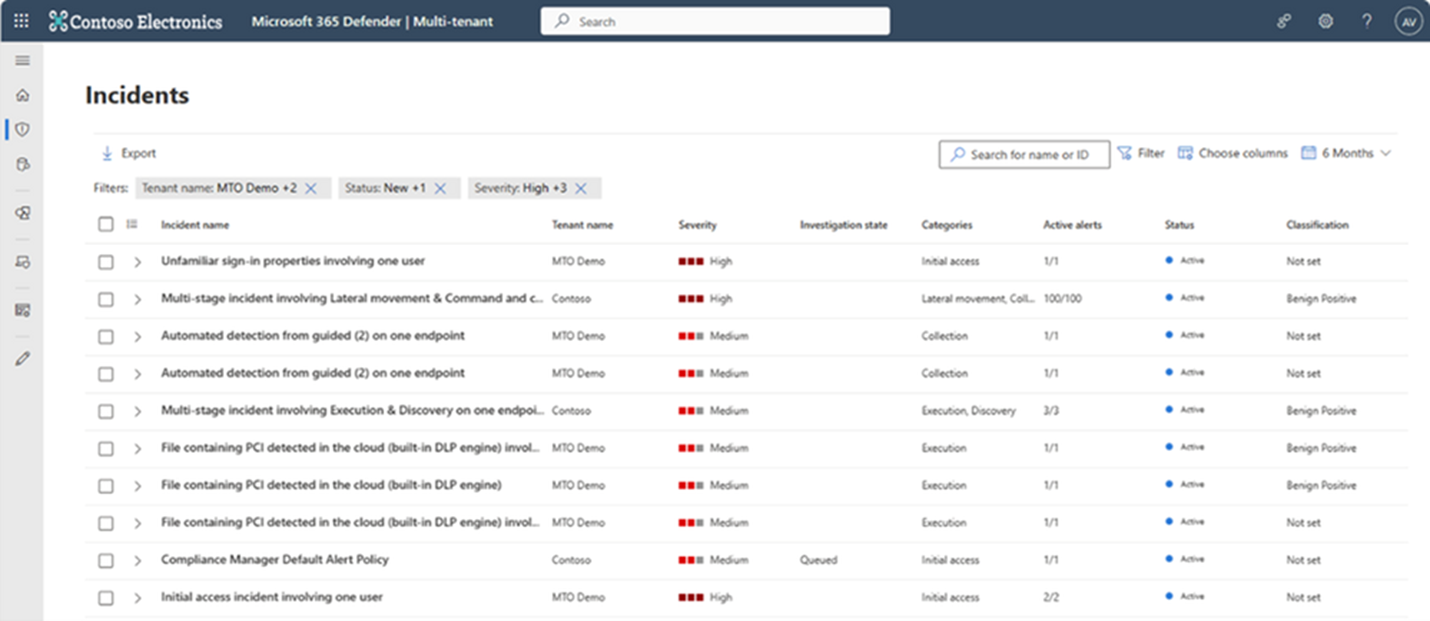
- Manage incidents across tenants: Microsoft Defender XDR provides a single, unified view of all tenants your organization manages, allowing for swift incident investigation and advanced threat hunting without the need to switch between tenant views.
- Simplify multi-tenant management: The newly defined multi-tenant organization boundary in Microsoft Entra ID P1 simplifies the enablement, configuration and management of the capabilities above. Whether through Microsoft Graph APIs or the Microsoft 365 Admin Center, setting up is intuitive and straightforward.
Find people across organizations easily with People Search
The multi-tenant organization (MTO) People Search is a collaboration feature that enables search and discovery of people across multiple tenants. A tenant admin can enable cross-tenant synchronization that allows users to be synced to another tenant and be discoverable in its global address list. Once enabled, users can search and discover synced user profiles from the other tenant and view their corresponding people cards.
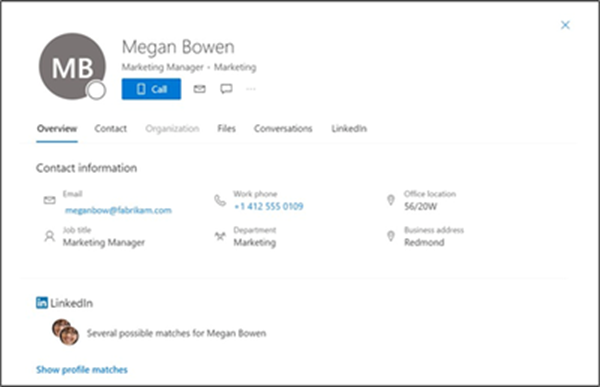
An image showing a synchronized user profile from another tenant in Microsoft 365
Streamline workforce collaboration with Microsoft Teams
Once administrators form a multi-tenant organization in the Entra ID platform organizations with the new Teams desktop client will automatically receive the Teams MTO features with no additional configuration.
Users can now join a meeting, chat, call, or collaborate in a channel hosted by another tenant, and simultaneously compose chat messages in their own tenant. Users can receive cross-tenant notifications for all accounts and tenants added to the Teams client, no matter which one is currently in focus.
People’s search is also improved. Searches for coworkers in a multi-tenant organization could often return multiple results for the same person. With the new MTO capabilities in the new Teams client, searching for a coworker in an MTO will return a single result, helping you to identify the correct colleague and keep your conversations in one place.

The new Teams desktop client showing improved people search capability on the right hand side
Users that join a meeting in another tenant can now bypass the meeting lobby, have access to all in-meeting content and resources and can collaborate in real time.
Manage incidents across tenants with Microsoft Defender XDR
Security operations teams that work with multiple tenants need a reliable and comprehensive security solution that can keep up with modern threats and provide unified and connected experience to enhance their security operations. Microsoft Defender XDR now delivers unified investigation and response experience for multi-tenant organizations alongside native protection across endpoints, identities, email, collaboration tools, cloud apps, and data.
With multi-tenant management in Microsoft Defender XDR, security operations teams can quickly investigate incidents and perform advanced hunting across data from multiple tenants, removing the need for administrators to log in and out of each individual tenant.
Enable Microsoft 365 multi-tenant capabilities with Microsoft Entra ID
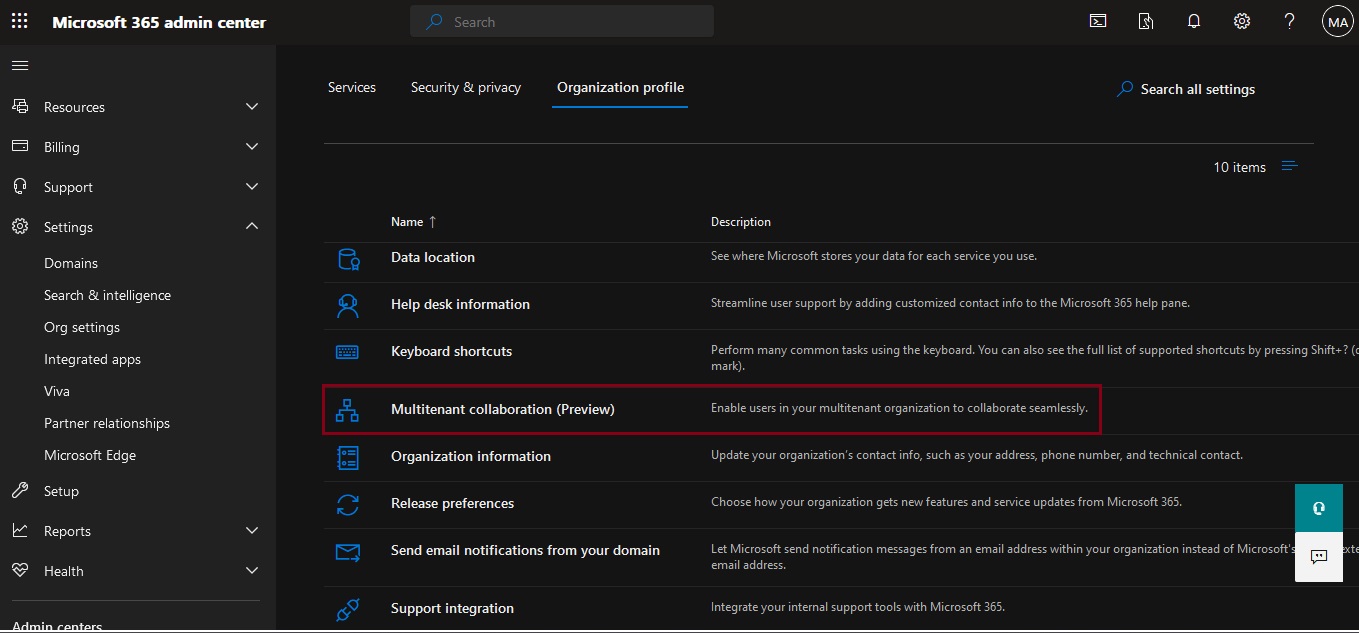
Multi-tenant organization platform capabilities are now rolling out to standard production tenants in Microsoft 365. To deliver the above capabilities, administrators can enable multi-tenant capabilities in the Microsoft 365 admin center and configure which users in the organization can take advantage of multi-tenant capabilities using either Microsoft 365 admin center or Microsoft Entra admin center.
This approach allows you to define a boundary around the Entra ID tenants that your organization owns, facilitated by an invite-and-accept flow between tenant administrators. Learn more about the process in the Microsoft 365 admin center here and using Microsoft Graph API’s here. We recommend the use of the Microsoft 365 admin center to simplify the setup experience and to view your newly created MTO:

Snapshot of a multitenant organization collaboration with three tenants.
Following the formation of the multi-tenant organization, Microsoft offers two methods to provision employees into neighboring multi-tenant organization tenants at scale.
- For a simplified experience, stay in the Microsoft 365 admin center to sync users into multiple tenants in your multi-tenant organization. Microsoft recommend this method for smaller multi-tenant organizations who plan on all employees receiving access to all multi-tenant organization tenants.
- For a customizable sync experience, head over to Entra ID cross-tenant synchronization. Cross-tenant synchronization is highly configurable and allows the provisioning of any multi-hub multi-spoke identity landscape. We recommend this method for enterprise organizations of complex identity landscapes. Either method works. Choose the one that works best for your specific organization!
Stay Tune…..

 Catastrophic Failure