
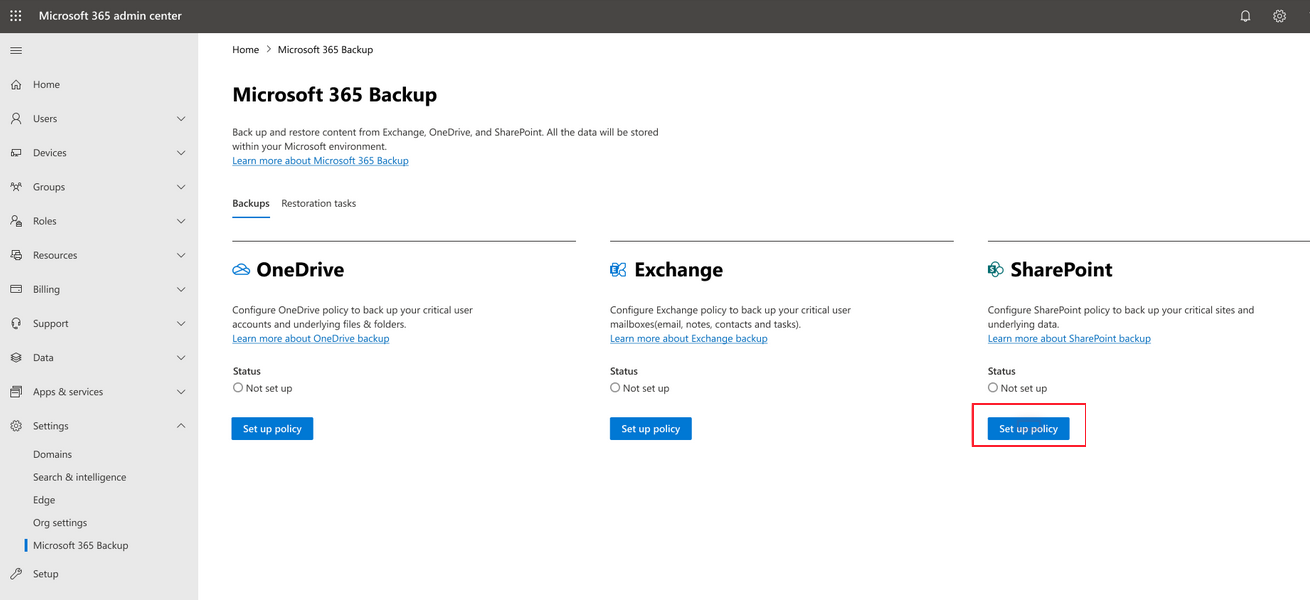
Microsoft 365 Backup is currently in preview and will begin rolling out to organizations in early 2024. You can set up billing for the product as described in Set up Microsoft 365 Backup. Once Microsoft 365 Backup has been deployed and is available for use in your tenant, you’ll see it in the Microsoft 365 admin center page under Settings.
During the preview period, performance and speed of web interfaces, initial configuration, and restores might be slower than expected as we scale up our infrastructure to remove undesirable latency from our system.
Business continuity assurance is a top-of-mind concern for many companies. Microsoft 365 Backup delivers business continuity peace of mind by providing performance and reliable restore confidence. When evaluating a backup and restore offering, what really matters isn’t solely the backup, but the ability to restore your data to a healthy state quickly when you need to do so. Recovering large volumes of content is difficult when copying data at a scale from a remote, air-gapped location requiring weeks or even months to get your business back up and running.
In cases of a ransomware attack that encrypts large swaths of your data, or instances of an internal accidental or malicious data deletion or overwrite event, you need to be able to get your business back to a healthy state as soon as possible. This is what the Microsoft 365 Backup product offers, both through the Microsoft 365 admin center, as well as via third-party applications built on the Microsoft 365 Backup Storage platform.
To summarize, applications built on top of the Microsoft 365 Backup Storage platform deliver the following benefits regardless of the size or scale of the protected tenant:
- Fast backup within hours
- Fast restore within hours (see performance targets later in this article)
- Full SharePoint site and OneDrive account restore fidelity, meaning the site and OneDrive are restored to their exact state at specific prior points in time via a rollback operation
- In the future, roll forward granular file-level restores in OneDrive and SharePoint
- Full Exchange mailbox item restores or granular item restores using search
- Consolidated security and compliance domain management
Walkthrough an overview of Microsoft 365 Backup here…
Architecture
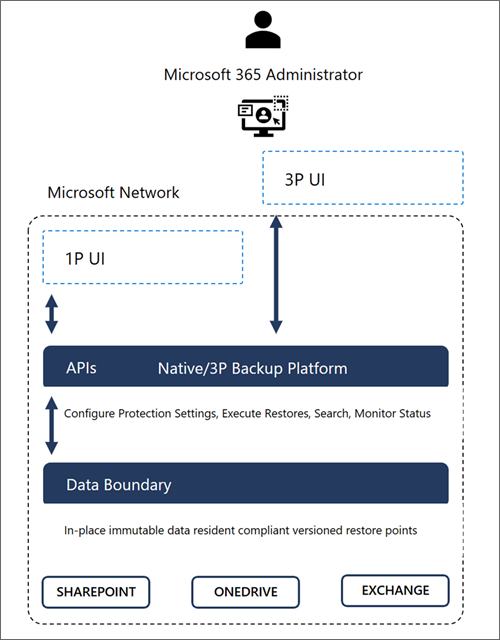
Microsoft 365 Backup provides ultra-fast backup and restore capabilities by creating backups within the protected services’ data boundaries.
Microsoft 365 Backup not only provides uniquely fast recovery from common business continuity and disaster recovery (BCDR) scenarios like ransomware or accidental/malicious employee content overwrite/deletion. Additional BCDR scenario protections are also built directly into the service. For example, OneDrive, SharePoint, and Exchange Online provide replicated copies of your data across geographically disparate datacenters to automatically protect against physical disasters and automatically failover to live active copies seamlessly without the need for end customer intervention.
Our backups are protected from malicious overwrites because OneDrive, SharePoint, and Exchange use Append-Only storage. This means that SharePoint can only add new content blobs and can never change old ones until they’re permanently deleted. The Exchange items are backed up in an immutable manner and can’t be accessed by a client process (such as Outlook, OWA, or MFCMAPI). This process ensures that items can’t be changed or corrupted after an initial save, protecting against attackers that try to corrupt old versions. For More information about the built-in service and data resiliency, see SharePoint and OneDrive data resiliency in Microsoft 365 and Exchange Online data resiliency in Microsoft 365.
Key architectural takeaways:
- Data never leaves the Microsoft 365 data trust boundary or the geographic locations of your current data residency.
- The backups are immutable unless expressly deleted by the Backup tool admin via product offboarding.
- OneDrive, SharePoint, and Exchange have multiple physically redundant copies of your data to protect against physical disasters.

 Catastrophic Failure