

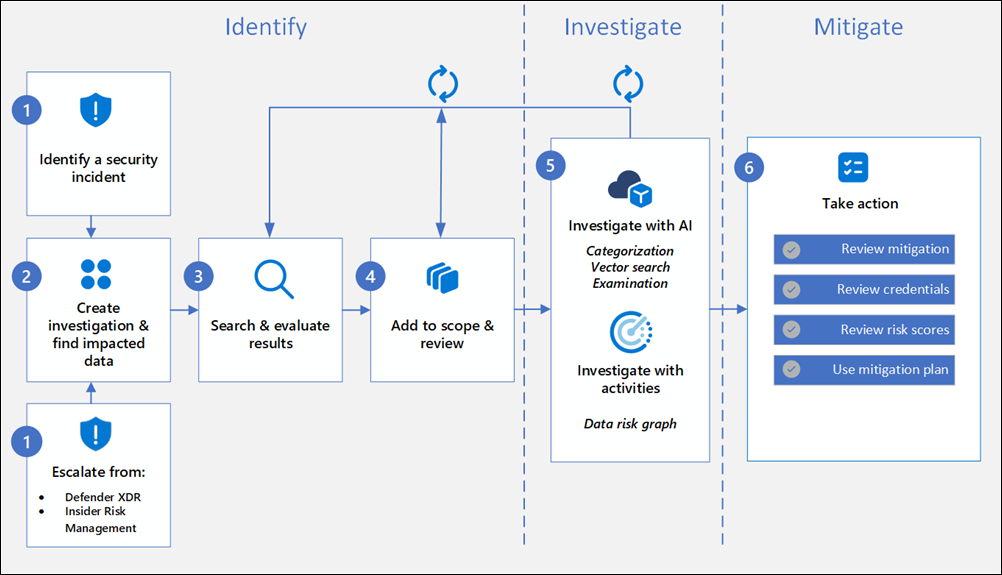
Data Security Investigations (preview) workflow helps you quickly identify, investigate, and take action on data associated with security and data breach incidents. This workflow isn’t a linear process. It includes significant iteration requirements for several of the steps to fine tune searches, evidence gathering, classification, and investigation by using AI and activities.

Analysts can use Data Security Investigations (preview) features in your organization to:
- Quickly and efficiently search, discover, and identify impacted data.
- Use deep content AI analysis to discover exact data risks hidden in data.
- Take action to reduce the impact of data security incidents and quickly mitigate ongoing risks.
- Collaborate with internal and external stakeholders on investigation details.
Check out the following videos to learn about how Data Security Investigations (preview) can help you respond to data security incidents:
- Microsoft Mechanics video
- Unlock the Power of Data Security Investigations with Microsoft Purview
- Microsoft Purview Data Security Investigations Ask Me Anything
DSI builds on and extends Microsoft Purview’s existing best-of-breed Data Security portfolio. Our information protection, data loss prevention, and insider risk management solutions have provided customers with a strong foundation to protect their crown jewels, their data. Data is at the center of cyberattacks, and now DSI will use AI to re-imagine how customers investigate and mitigate data security incidents, accelerating the process dramatically. Most organizations we spoke to (77%) believe that AI will accelerate data security detection and response, and 76% think AI will improve the accuracy of data security detection and response strategies. With its cutting edge, generative AI-powered investigative capabilities, DSI will transform and scale how data security admins analyze incident-related data. DSI uncovers key security and sensitive data risks and facilitates secure collaboration between partner teams to mitigate those identified risks. This simplifies previously complex, time-consuming tasks – what once took months, can now be done in a fraction of the time.
Read more:
Get started with Data Security Investigations (preview)
Learn about Data Security Investigations (preview)
 Catastrophic Failure