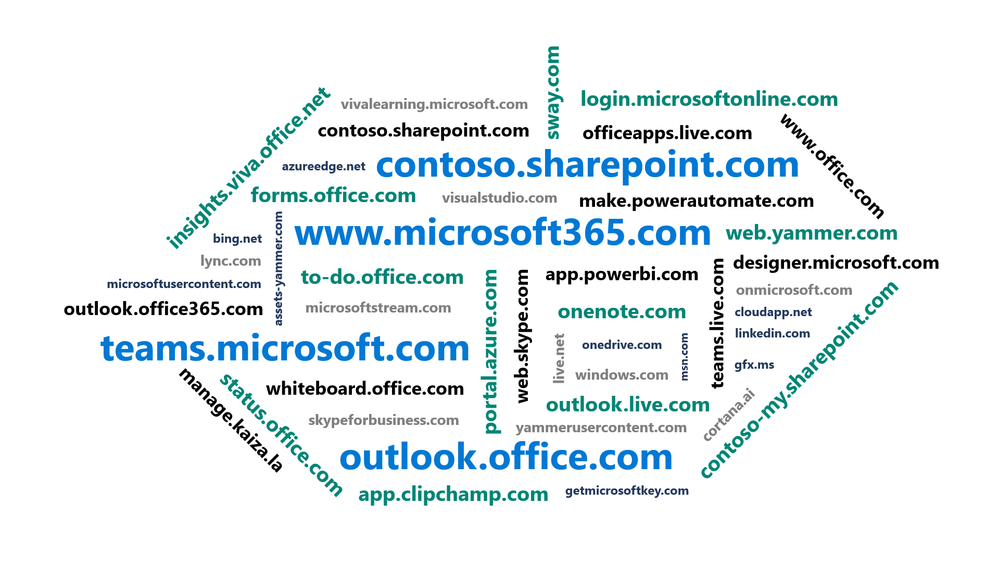
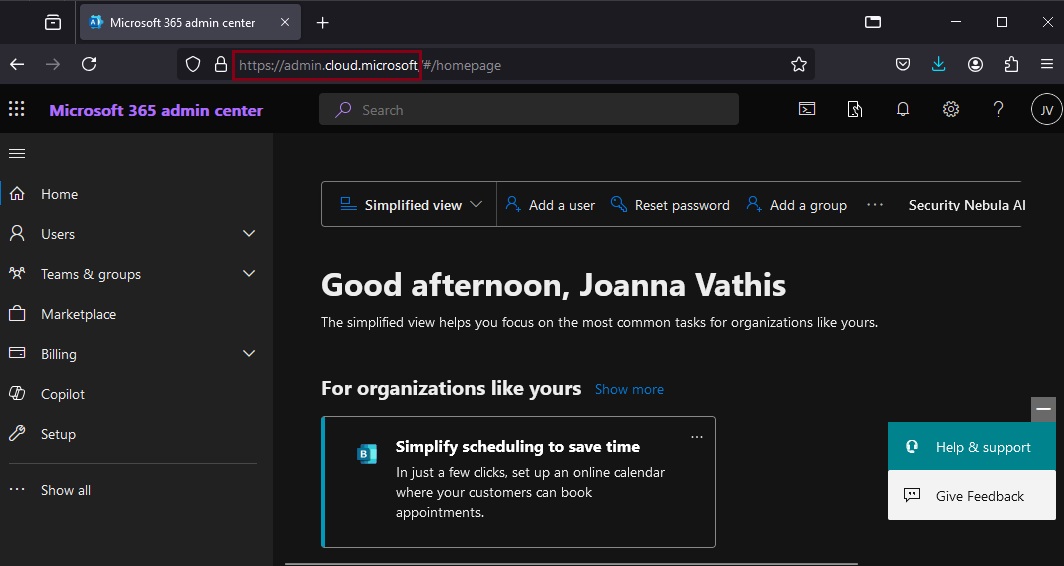
As Microsoft cloud services have grown over the years, the domain space they live on has grown as well – into the hundreds. Over time, this fragmentation has created increasing challenges for end user navigation, administrative simplicity, and the development of cross-app experiences. Microsoft’s announcement, “cloud.microsoft is the new unified domain for Microsoft 365 apps and services.” It promises greater security and unified experience.
Why cloud.microsoft?
‘Dot brand’ top-level domains like .microsoft are an established method for enhancing the security, trustworthiness, and integrity of an organization’s web offerings. Similar to how the US government has exclusive rights to the .gov top-level domain (TLD), Microsoft has exclusive rights to the .microsoft TLD. Exclusive ownership enables enhanced security protocols and governance controls, and the value of security investments done at the top-level domain seamlessly accrue to the apps. And all experiences hosted on the .microsoft domain can be assumed to be legitimate and authentic: anyone attempting domain spoofing would have to go through Microsoft itself, as we are both the registry operator and sole registrant for this exclusive, trusted namespace. A common term before the “dot” is also necessary in order to realize the full benefits of a unified domain. “Cloud” was selected as a durable, extensible, neutral term with a meaningful relationship to the wide range of services that will come under its umbrella, starting with Microsoft 365.
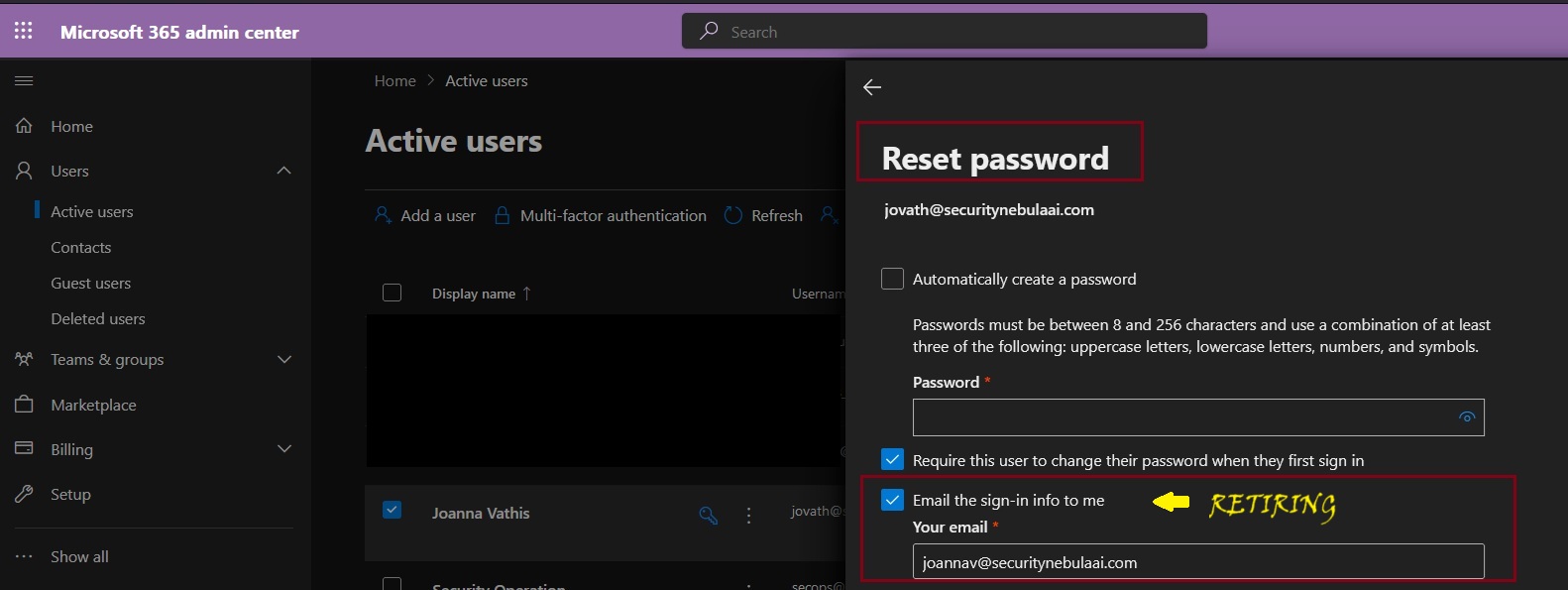
Microsoft will be retiring the Send password in email feature from Microsoft 365 admin center starting August 30, 2024. Instead, Microsoft recommend using the new Printoption in the Microsoft admin center to save the user account details and share them in a secure manner with your users.
Admins will no longer be able to receive usernames and passwords in email after this change is implemented. This change will happen automatically by the specified date. No admin action is required.
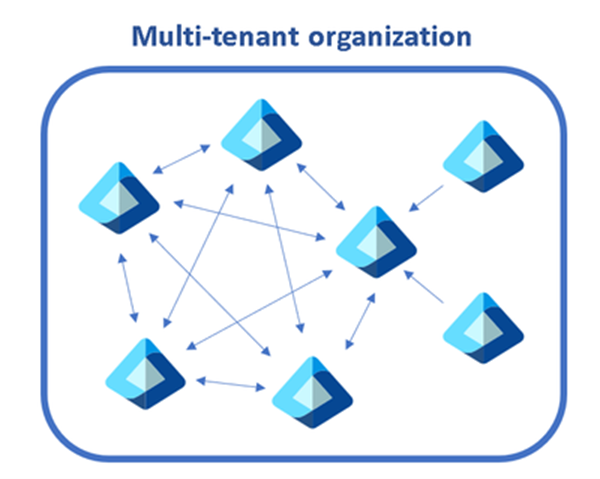
On the 25th of April, Microsoft announced a robust set of multi-tenant organization (MTO) capabilities within Microsoft 365, now generally available to enhance any organization’s collaboration, communication, and administration across multiple tenants. These capabilities span Microsoft 365 People Search, Microsoft Teams, Viva Engage and Microsoft Defender XDR, which can be enabled via the Microsoft 365 admin center or Microsoft Entra admin center.
This segmentation can cause frustration when users need to communicate and collaborate across tenant boundaries, whilst IT admins need to perform the same set of administrative tasks per tenant to maintain their organization.
A diagram showing multiple tenants within a single organization.
The capabilities we discuss below help multi-tenant organizations address these complexities, while staying compliant and secure:
Find people across organizations easily: Search for and communicate with colleagues in a unified manner with improved people search. Every search now returns a single, accurate result, simplifying how you connect with the right colleague.
Streamlined workforce collaboration: Engage in calls, chats, and meetings across tenants without the barriers of meeting lobbies. Enjoy immediate access to meeting content and collaborative tools in real time.
Unlock new ways for employees and leaders to connect: We’ve broadened the capabilities in Viva Engage, facilitating cross-tenant announcements and enabling community interaction and campaign participation that extend beyond tenant boundaries.
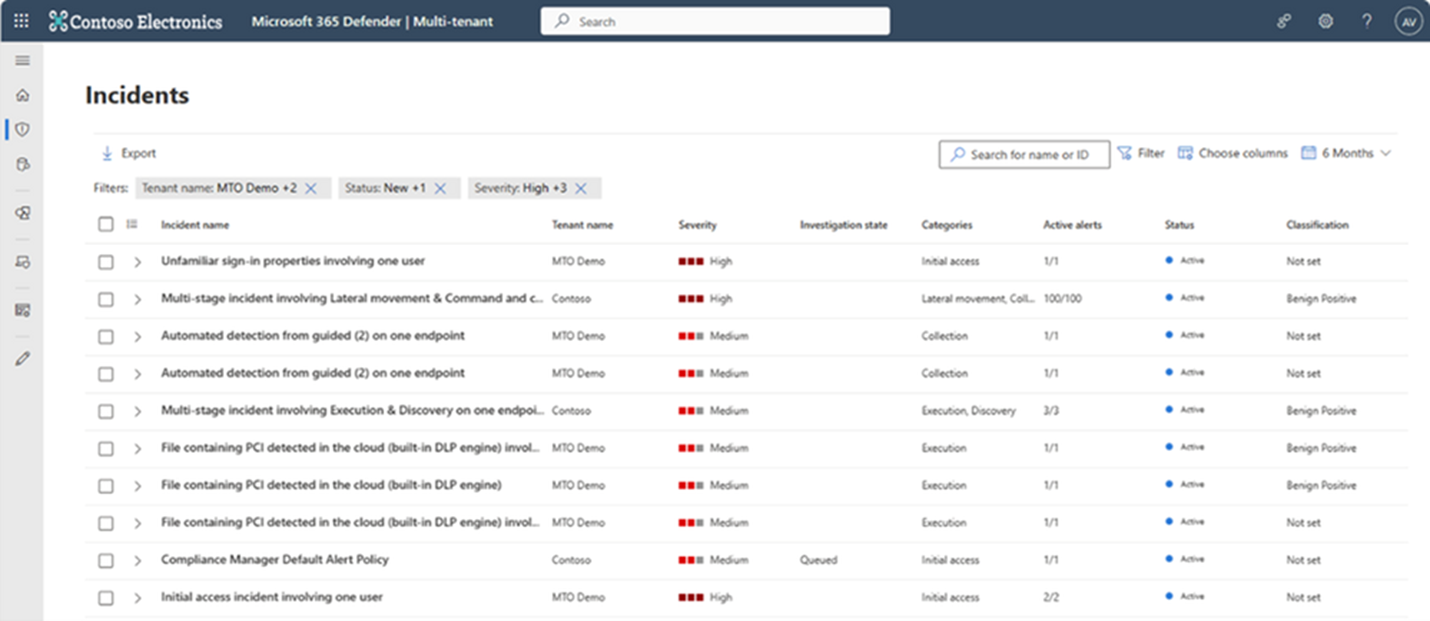
Manage incidents across tenants: Microsoft Defender XDR provides a single, unified view of all tenants your organization manages, allowing for swift incident investigation and advanced threat hunting without the need to switch between tenant views.
Simplify multi-tenant management: The newly defined multi-tenant organization boundary in Microsoft Entra ID P1 simplifies the enablement, configuration and management of the capabilities above. Whether through Microsoft Graph APIs or the Microsoft 365 Admin Center, setting up is intuitive and straightforward.
Find people across organizations easily with People Search
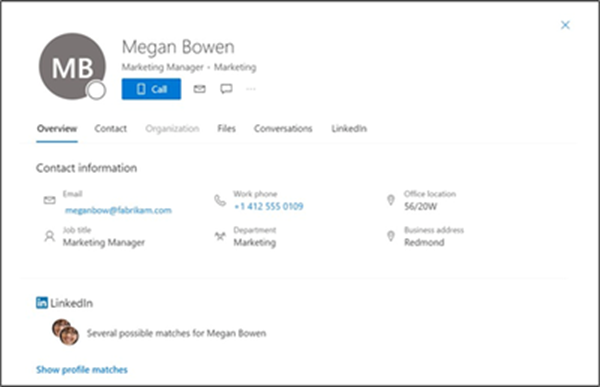
The multi-tenant organization (MTO) People Search is a collaboration feature that enables search and discovery of people across multiple tenants. A tenant admin can enable cross-tenant synchronization that allows users to be synced to another tenant and be discoverable in its global address list. Once enabled, users can search and discover synced user profiles from the other tenant and view their corresponding people cards.
An image showing a synchronized user profile from another tenant in Microsoft 365
Streamline workforce collaboration with Microsoft Teams
Once administrators form a multi-tenant organization in the Entra ID platform organizations with the new Teams desktop client will automatically receive the Teams MTO features with no additional configuration. Users can now join a meeting, chat, call, or collaborate in a channel hosted by another tenant, and simultaneously compose chat messages in their own tenant. Users can receive cross-tenant notifications for all accounts and tenants added to the Teams client, no matter which one is currently in focus. People’s search is also improved. Searches for coworkers in a multi-tenant organization could often return multiple results for the same person. With the new MTO capabilities in the new Teams client, searching for a coworker in an MTO will return a single result, helping you to identify the correct colleague and keep your conversations in one place.
The new Teams desktop client showing improved people search capability on the right hand side Users that join a meeting in another tenant can now bypass the meeting lobby, have access to all in-meeting content and resources and can collaborate in real time.
Manage incidents across tenants with Microsoft Defender XDR
Security operations teams that work with multiple tenants need a reliable and comprehensive security solution that can keep up with modern threats and provide unified and connected experience to enhance their security operations. Microsoft Defender XDR now delivers unified investigation and response experience for multi-tenant organizations alongside native protection across endpoints, identities, email, collaboration tools, cloud apps, and data.
With multi-tenant management in Microsoft Defender XDR, security operations teams can quickly investigate incidents and perform advanced hunting across data from multiple tenants, removing the need for administrators to log in and out of each individual tenant.
Enable Microsoft 365 multi-tenant capabilities with Microsoft Entra ID
Multi-tenant organization platform capabilities are now rolling out to standard production tenants in Microsoft 365. To deliver the above capabilities, administrators can enable multi-tenant capabilities in the Microsoft 365 admin center and configure which users in the organization can take advantage of multi-tenant capabilities using either Microsoft 365 admin center or Microsoft Entra admin center.
This approach allows you to define a boundary around the Entra ID tenants that your organization owns, facilitated by an invite-and-accept flow between tenant administrators. Learn more about the process in the Microsoft 365 admin center here and using Microsoft Graph API’s here. We recommend the use of the Microsoft 365 admin center to simplify the setup experience and to view your newly created MTO:
Snapshot of a multitenant organization collaboration with three tenants.
Following the formation of the multi-tenant organization, Microsoft offers two methods to provision employees into neighboring multi-tenant organization tenants at scale.
For a simplified experience, stay in the Microsoft 365 admin center to sync users into multiple tenants in your multi-tenant organization. Microsoft recommend this method for smaller multi-tenant organizations who plan on all employees receiving access to all multi-tenant organization tenants.
For a customizable sync experience, head over to Entra ID cross-tenant synchronization. Cross-tenant synchronization is highly configurable and allows the provisioning of any multi-hub multi-spoke identity landscape. We recommend this method for enterprise organizations of complex identity landscapes. Either method works. Choose the one that works best for your specific organization!
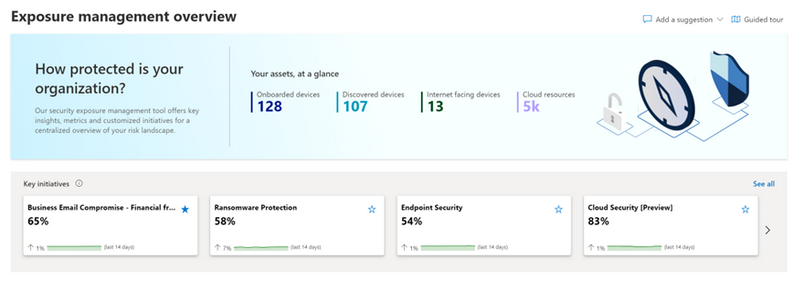
Today, March 13, Microsoft announce the public preview release of Microsoft Security Exposure Management. This transformative solution unifies disparate data silos, extending end-to-end visibility to security teams across all assets. By enabling a thorough assessment of security posture and exposure, this solution equips teams to not only grasp their current security landscape but also elevate it to new heights. Microsoft Security Exposure Management serves as a cornerstone for proactive risk management, empowering organizations to adeptly navigate and mitigate threat exposure across their entire attack surface.
Microsoft Security Exposure Management empowers customers to:
Build an effective exposure management program with a continuous threat exposure management (CTEM) process.
Reduce risk with a clear view of every asset and real-time assessment of potential exposures both inside-out and outside-in.
Identify and classify critical assets, ensuring they are protected against a wide variety of threats.
Discover and visualize potential adversary intrusion paths, including lateral movement, to proactively identify and stop attacker activity.
Communicate exposure risk to business leaders and stakeholders with clear KPIs and actionable insights.
Enhance exposure analysis and remediation by integrating with third-party data sources and tools
At launch, we are introducing new capabilities that are foundational to exposure management programs:
Attack Surface Management: Provides a comprehensive view of the entire attack surface, allowing the exploration of assets and their relationships.
Attack Path Analysis: Assists security teams in visualizing and prioritizing attack paths and risks across environments, enabling focused remediation efforts to reduce exposure and breach likelihood.
Unified Exposure Insights: Provides decision-makers with a consolidated, clear view of an organization’s threat exposure, facilitating security teams in addressing critical questions about security posture.
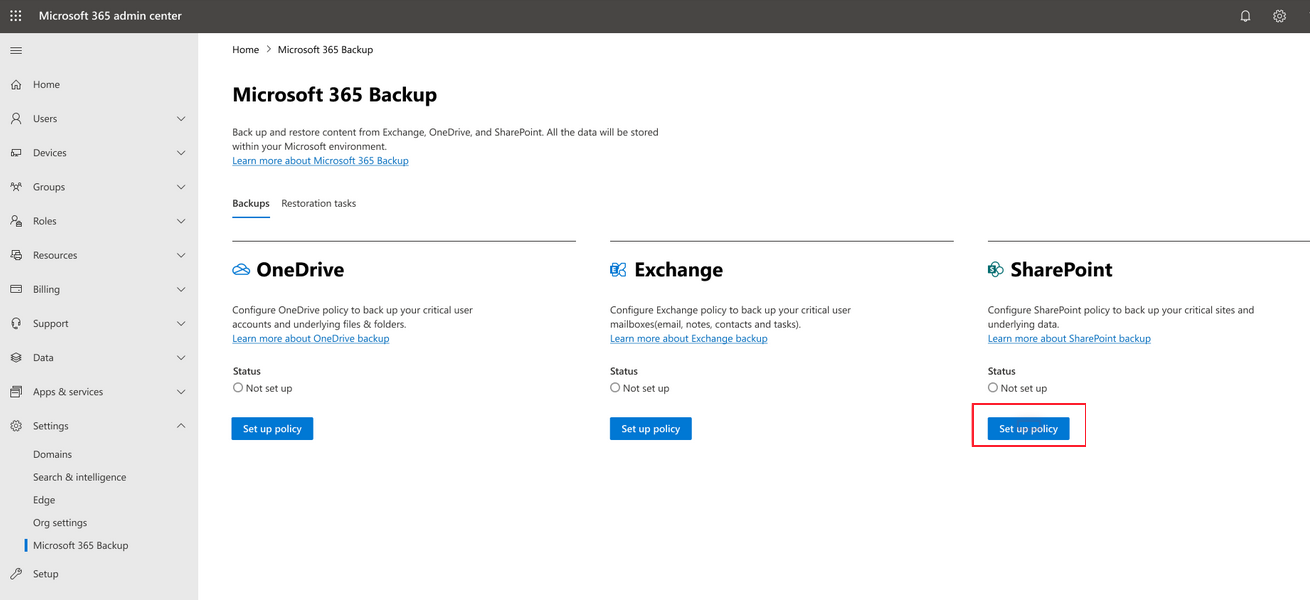
Microsoft 365 Backup is currently in preview and will begin rolling out to organizations in early 2024. You can set up billing for the product as described in Set up Microsoft 365 Backup. Once Microsoft 365 Backup has been deployed and is available for use in your tenant, you’ll see it in the Microsoft 365 admin center page under Settings.
During the preview period, performance and speed of web interfaces, initial configuration, and restores might be slower than expected as we scale up our infrastructure to remove undesirable latency from our system.
Business continuity assurance is a top-of-mind concern for many companies. Microsoft 365 Backup delivers business continuity peace of mind by providing performance and reliable restore confidence. When evaluating a backup and restore offering, what really matters isn’t solely the backup, but the ability to restore your data to a healthy state quickly when you need to do so. Recovering large volumes of content is difficult when copying data at a scale from a remote, air-gapped location requiring weeks or even months to get your business back up and running.
In cases of a ransomware attack that encrypts large swaths of your data, or instances of an internal accidental or malicious data deletion or overwrite event, you need to be able to get your business back to a healthy state as soon as possible. This is what the Microsoft 365 Backup product offers, both through the Microsoft 365 admin center, as well as via third-party applications built on the Microsoft 365 Backup Storage platform.
To summarize, applications built on top of the Microsoft 365 Backup Storage platform deliver the following benefits regardless of the size or scale of the protected tenant:
Full SharePoint site and OneDrive account restore fidelity, meaning the site and OneDrive are restored to their exact state at specific prior points in time via a rollback operation
In the future, roll forward granular file-level restores in OneDrive and SharePoint
Full Exchange mailbox item restores or granular item restores using search
Consolidated security and compliance domain management
Walkthrough an overview of Microsoft 365 Backup here…
Architecture
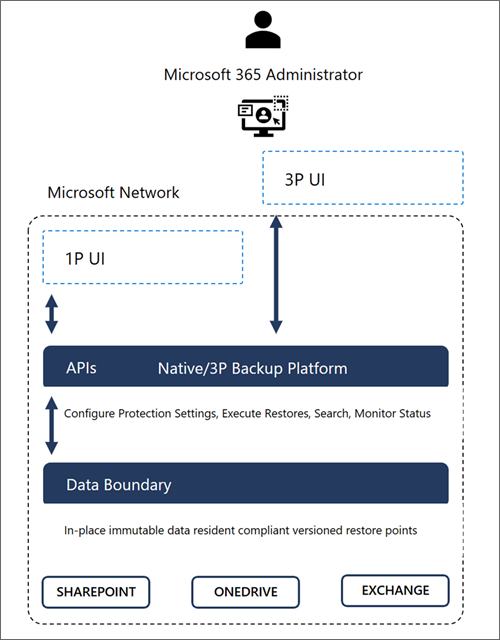
Microsoft 365 Backup provides ultra-fast backup and restore capabilities by creating backups within the protected services’ data boundaries.
Microsoft 365 Backup not only provides uniquely fast recovery from common business continuity and disaster recovery (BCDR) scenarios like ransomware or accidental/malicious employee content overwrite/deletion. Additional BCDR scenario protections are also built directly into the service. For example, OneDrive, SharePoint, and Exchange Online provide replicated copies of your data across geographically disparate datacenters to automatically protect against physical disasters and automatically failover to live active copies seamlessly without the need for end customer intervention.
Our backups are protected from malicious overwrites because OneDrive, SharePoint, and Exchange use Append-Only storage. This means that SharePoint can only add new content blobs and can never change old ones until they’re permanently deleted. The Exchange items are backed up in an immutable manner and can’t be accessed by a client process (such as Outlook, OWA, or MFCMAPI). This process ensures that items can’t be changed or corrupted after an initial save, protecting against attackers that try to corrupt old versions. For More information about the built-in service and data resiliency, see SharePoint and OneDrive data resiliency in Microsoft 365 and Exchange Online data resiliency in Microsoft 365.
Key architectural takeaways:
Data never leaves the Microsoft 365 data trust boundary or the geographic locations of your current data residency.
The backups are immutable unless expressly deleted by the Backup tool admin via product offboarding.
OneDrive, SharePoint, and Exchange have multiple physically redundant copies of your data to protect against physical disasters.




 Catastrophic Failure