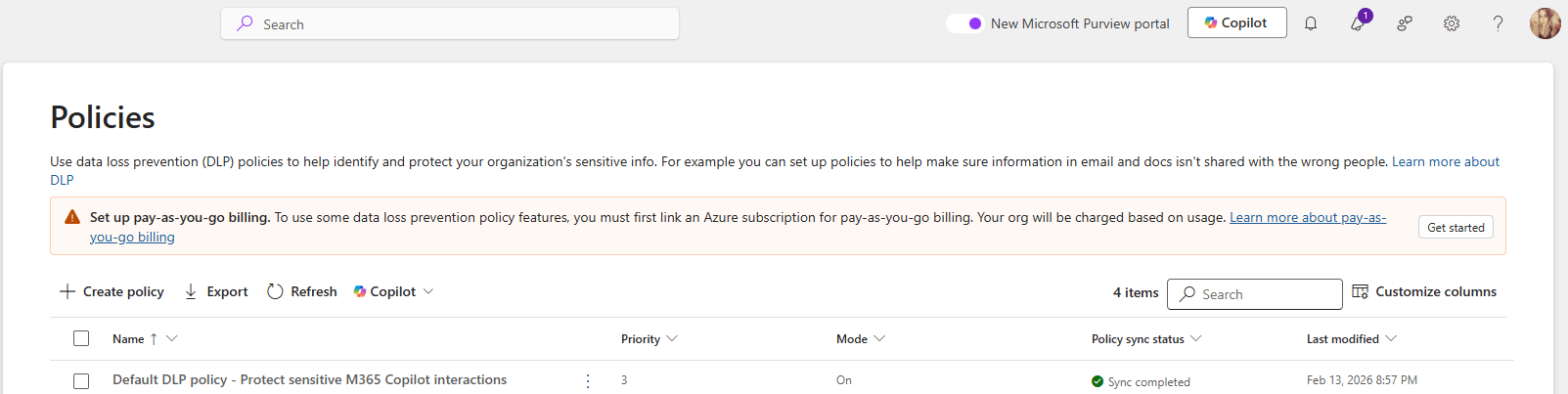
Microsoft Purview DLP Gets Smarter Troubleshooting with Guided Diagnostics

If you’ve ever tried to troubleshoot why a Data Loss Prevention (DLP) policy behaved the way it did, you’ll know it’s not always obvious what happened behind the scenes. Microsoft is looking to change that.

Microsoft is rolling out a new guided diagnostics experience in Microsoft Purview Data Loss Prevention (DLP), designed to help administrators quickly understand, diagnose, and resolve DLP policy issues. The goal is simple: make DLP behavior easier to explain, easier to fix, and easier to optimize.

This update is tracked under Microsoft 365 Roadmap ID 561032.

When is this coming?
  • Public Preview: Mid‑May 2026 to Mid‑June 2026
  • General Availability (Worldwide): Late June 2026 to July 2026
Who does this affect?

This update is primarily aimed at:

  • Microsoft 365 administrators managing DLP policies in Microsoft Purview
  • Commercial Microsoft 365 tenants

If your organization has Microsoft 365 E5 and Copilot licensing, you’ll also benefit from Security Copilot‑powered insights, which add intelligent recommendations during troubleshooting.

What’s changing?

A new guided diagnostics experience will appear directly in the Microsoft Purview portal, making it much easier to understand what your DLP policies are doing and why.

With this experience, admins can:

  • See the order in which DLP policies are evaluated
  • Understand which conditions were matched
  • Clearly identify what action was taken (allow, block, or audit)

In other words, instead of guessing or piecing together logs, you’ll get a clearer, step‑by‑step explanation of how a DLP decision was made.

Security Copilot‑powered insights (for eligible tenants)

For organizations with the right licensing, Microsoft brings Copilot into the experience to help:

  • Spot potential policy misconfigurations
  • Speed up DLP troubleshooting
  • Get recommendations for improving and optimizing policies
What’s not changing?
  • Existing DLP policies continue to work exactly as they do today
  • Enforcement behavior is unchanged
  • There is no impact on end‑user workflows

This update is purely about visibility and diagnostics, not policy enforcement.

That said, you may want to:

  • Update internal DLP troubleshooting documentation to reference the new guided diagnostics experience
  • Make sure your security and compliance teams are aware of the new diagnostics flow in the Purview portal
  • Review your Copilot and E5 licensing to understand whether Security Copilot‑powered insights will be available in your tenant

Microsoft Purview | DLP protections to prevent sensitive data from leaving your organization through external web search in Microsoft 365 Copilot and Copilot Chat

Microsoft is rolling out an important enhancement to help organizations use Microsoft 365 Copilot more securely. Starting this year, Microsoft Purview Data Loss Prevention (DLP) will include new protections designed specifically for Copilot and Copilot Chat. The goal: prevent sensitive data from being sent to external web search engines during AI‑assisted interactions.

This update introduces real‑time DLP evaluation for prompts that contain Sensitive Information Types (SITs). When Copilot detects protected data in a user’s prompt, it will block any external web search from taking place. Instead, Copilot will continue responding only with internal Microsoft Graph data provided that the user’s licensing allows it.

This feature corresponds with Microsoft 365 Roadmap ID 548671.

Rollout Timeline

Public Preview
Begins: Late March 2026
Completes: Late April 2026

General Availability (Worldwide)
Begins: Late June 2026
Completes: Late July 2026

What This Means for Your Organization
Who Will Be Affected?

This update is relevant for:

  • Organizations using Microsoft 365 Copilot, Copilot Chat, or Copilot Studio agents published to Microsoft 365.
  • Admins who manage Data Loss Prevention policies in the Microsoft Purview portal.
What’s Changing?
New DLP Control for Copilot Web Search

Admins will soon see a new option when configuring DLP policies: the ability to stop Copilot from using external web search when a prompt includes specific sensitive information types.

When this policy is triggered:

  • Copilot will not send content to external web search providers.
  • Copilot will still respond, drawing exclusively from internal Microsoft Graph data sources (assuming the user’s licensing supports this).

New in Microsoft Defender XDR: AI‑Powered Summaries for DLP Alerts

Microsoft is rolling out a great new capability that will make life much easier for anyone who works with Data Loss Prevention (DLP) alerts. You’ll now start seeing AI‑generated summaries and categorizations, produced by the Microsoft Purview Data Security Triage Agent, directly inside the Microsoft Defender XDR portal.

This means faster triage, clearer insights, and less time manually digging through alert details.

What’s new?

When a DLP alert fires, analysts will now see:

  • A concise AI‑generated summary of what happened
  • A suggested categorization of the alert
  • Context pulled directly from the incident to help speed up investigation

If you’ve already deployed the Triage Agent in Purview, these summaries will show up automatically in your Defender XDR alerts. If not, eligible analysts will be able to deploy it directly from the alert page super handy.

Rollout timeline

Public Preview
Starts: Early April 2026
Completed by: Mid‑April 2026

General Availability (Worldwide)
Starts: Mid‑August 2026
Completed by: Late August 2026

Roadmap ID: 558860

Who is impacted?

This update is especially helpful for:

  • Security analysts and administrators triaging DLP alerts in Defender XDR
  • Organizations already using (or planning to use) Microsoft Purview’s Data Security Triage Agent

Existing DLP policies, enforcement, and user experience remain unchanged.

Data Security Investigations introduces new soft purge mitigation action

Microsoft is introducing a new soft purge action in Data Security Investigations (DSI), giving admins a quick and safe way to remove sensitive or overshared files during an investigation. With soft purge, items can be deleted immediately but still recovered later as long as they’re within their deleted‑item retention period, so admins get speed without risking permanent data loss.

This builds on DSI’s growing set of AI‑powered tools like intelligent categorization, AI search, and automated risk insights making it easier than ever for organizations to spot issues and take action fast.

New update coming to Microsoft 365 Roadmap ID 558109. A soft purge action will soon be available in Data Security Investigations (DSI), giving admins a safer and more flexible way to remove sensitive or overshared content during an investigation.

When it’s rolling out
  • General Availability (Worldwide): Begins early April 2026
  • Expected completion: late May 2026

What this means for your organization

Who is affected?

Admins who use Data Security Investigations (DSI) in the Microsoft Purview compliance portal.

What’s changing

A new soft purge option will appear in DSI. With this action, admins can:

  • Remove items that match an investigation query
  • Keep those items recoverable until the retention period expires
  • Act quickly without risking accidental permanent deletion

And the best part:

  • The feature is on by default
  • No configuration needed
  • No changes to existing DLP, labeling, or retention policies
  • End users will not see any changes in their workflows

Once the rollout finishes, the feature simply appears for eligible tenants.

How to prepare

There is nothing you need to do in advance.
If you want to get ahead, you may consider:

  • Reviewing how soft purge works in DSI
  • Updating any internal guidance on investigation processes
  • Informing your security or compliance teams about the new action

Overall, this update gives organizations a safer and more controlled way to remove sensitive content during investigations—without adding extra steps or complexity.

DLP Policies Now Block Copilot Processing Across All Storage Locations

Microsoft is improving how Microsoft Purview Data Loss Prevention (DLP) protects content used by Microsoft 365 Copilot. Until now, DLP rules that block Copilot from processing sensitivity‑labeled content only worked when files lived in SharePoint or OneDrive.

With this update, those same protections will work everywhere, including local files stored on a user’s device. Organizations have asked for more consistent protection across all file locations, and this update delivers exactly that.

This change is associated with Microsoft 365 Roadmap ID 557255.

When it’s coming

General Availability (Worldwide + GCC)
Rollout: Late March 2026 → Late April 2026

Who this impacts

  • Organizations using Microsoft Purview DLP to limit what Copilot can access
  • Admins who manage Purview DLP rules
  • Users working with Copilot in Word, Excel, or PowerPoint

What’s changing

DLP rules that block Copilot from processing certain sensitivity-labeled files will now apply to:

  • SharePoint
  • OneDrive for Business
  • Local device storage
  • Any other file location Office apps can open

So if a DLP policy says “Copilot cannot process Confidential files,” then Copilot will not process those files anywhere, including when they’re opened directly from the desktop.

Key notes:

  • Existing DLP rules continue to work as they do today—no reconfiguration needed.
  • The feature turns on automatically for tenants already using relevant DLP policies.
  • Users will experience consistent protection when using Copilot across Word, Excel, and PowerPoint.

How it works (technical detail)

This update doesn’t change what Copilot can do—it changes how Office apps share sensitivity label information with AugLoop (the Copilot orchestration layer).

Today:
AugLoop reads file labels through Microsoft Graph
This only works for SharePoint or OneDrive files

After the update:

  • Office apps will pass the sensitivity label directly to AugLoop
  • This means DLP rules can finally apply to local and other non-cloud storage files too

This results in uniform, predictable DLP enforcement across all file locations.

Updated Announcement: Microsoft Purview – New Purview Agent Deployment Role

Microsoft Purview introduces a new Purview Agent Deployment role added to several built-in role groups, allowing analysts to deploy and manage Purview agents without admin help. Rollout starts late February 2026, improving onboarding and agent use while maintaining existing data access and compliance controls.

Microsoft introducing a new Microsoft Purview Role-Based Access Control (RBAC) role—Purview Agent Deployment—and adding it to several existing built‑in Purview role groups. This enhancement empowers analysts who work with Purview agents to deploy and manage them directly, without requiring administrator involvement. The change streamlines onboarding and supports broader adoption of Purview’s AI‑powered agent capabilities.

This update corresponds to Roadmap ID 551147.

Rollout Timeline

  • General Availability (Worldwide): Begins late February 2026
  • Expected Completion: Mid‑March 2026

Who is affected

  • Administrators managing Purview role groups
  • Analysts deploying or working with Microsoft Purview agents

What’s changing

The new Purview Agent Deployment role will be added to the following built‑in role groups:

  • Compliance Administrator
  • Data Security Management
  • Information Protection
  • Information Protection Analysts
  • Information Protection Investigators
  • Insider Risk Management
  • Insider Risk Management Analyst
  • Insider Risk Management Investigator
  • Purview Agent Management

The Purview Agent Management role group will continue to include the Purview Content Analyst role and retain access to Posture agent capabilities.

Capabilities enabled

Users assigned to these role groups will be able to deploy, use, and manage Purview agents end‑to‑end, including:

  • Data Loss Prevention (DLP) — Data Security Triage Agent
  • Insider Risk Management (IRM) — Data Security Triage Agent
  • Data Security Posture Management (DSPM) — Posture Agent
  • Future Purview agents as they are released

Important:

  • No default data access permissions are modified.
  • No new visibility into customer content is introduced.
  • Organizations can optionally enforce separation of responsibilities by using custom role groups.